

Why the quality of what you get from AI depends less on the tool and more on how clearly you ask.
Almost all of us have been in a situation where we had to ask an AI to write some text, design a website, or calculate particular numbers. The AI gives an answer in the blink
+,kmbv
an eye, and it all seems great until you realize it is not what you actually wanted.
You try asking again, adding or removing some details, clarifying a few points, and after ten iterations, you finally get something usable. The AI did its job every single time, but the request was not clear enough for it to fulfill on the first try.
This is where specifications, or “specs,” come into play. A specification is a description of what you want done before actual work begins. Teams who utilize specs when working with AI report significantly better results, faster workflows, and less back-and-forth communication. Teams that do not use them waste hours upon hours trying to train the AI to guess what they want. This post explains why this happens and how you can fix it.
What is a specification or spec, in simple words?
Forget the heavy engineering meaning for a moment. A specification is just an answer to four simple questions, written down before you ask the AI to do anything:
- What exactly do I want? The task, described without unclear words.
- Who is it for? The audience or the system that will use the output.
- What are the rules? Length, tone, format, data sources, things to avoid.
- How will I know it is done well? A simple test for success.
A spec can be as simple as a few bullet points or as detailed as a multi-page document. It all depends on the complexity of the task at hand. In short, specs describe what you want the AI to do.
The cost of an unclear request
An AI model reasons in probabilities. When you give it an unclear request, it will not stop to ask you to clarify. Instead, it will make guesses in all places where it cannot extract specific meaning. Requests like “professional,” “short,” or “improve this” can have vastly different meanings to different people, and an AI will pick one at random.
Each guess is a flip of a coin — and a request can contain dozens of guesses. The chances that all of them will match your expectations are extremely low. This is why the first attempt at fulfilling a request almost always feels like “almost right but not quite”.
The figure below shows the same request, asked two ways.
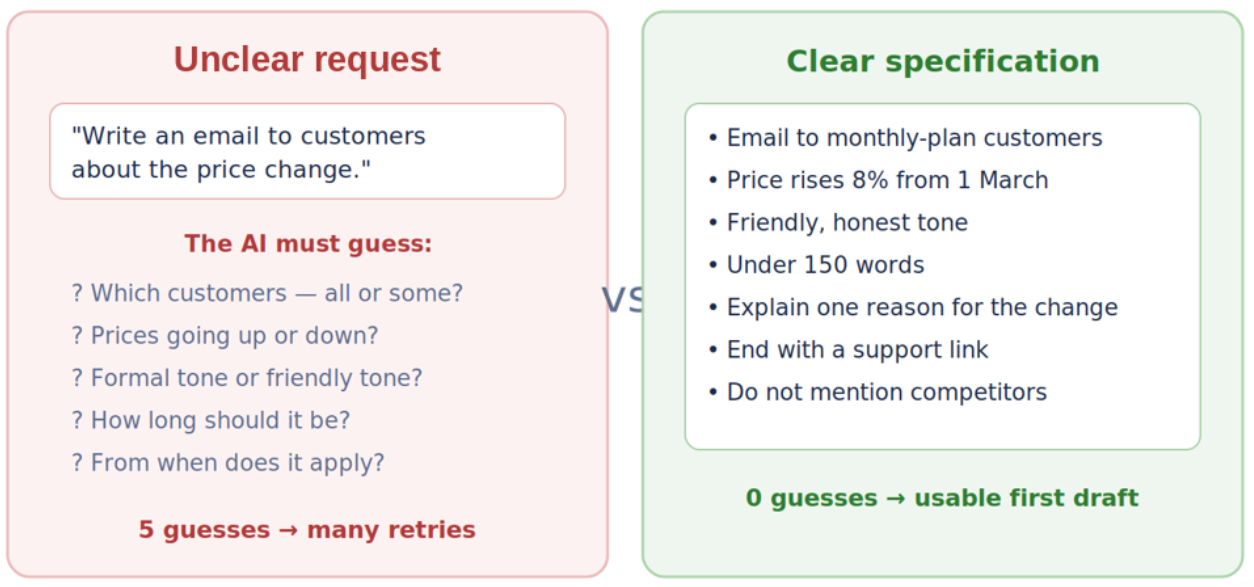
Figure 1 — The same request asked two different ways.
What actually changes when you add specs
Adding a spec feels like extra work at the start. Five or ten minutes of thinking and writing before you touch the AI tool. But that small investment changes the whole shape of the workflow. Here is what teams typically notice.
1. Far less rework
Rework is the silent tax of AI workflows. Every retry costs your time, attention, and often patience. When your starting point is close to the mark, you spend your effort on polish instead of repair.
2. Consistent output across team members
Without specs, every team member has to reinvent the wheel. With specs, everyone works from the same playbook. This is critical for maintaining tone of voice, style guides, and automated code reviews.
3. Easier review and approval
A spec serves as a review checklist. Instead of asking “does this feel right,” a reviewer can go through each point in the spec and ensure that the result adheres to it. This makes the review process more transparent, efficient, and less subjective.
4. Trust in automation
This is the big one. This one is huge. You can only delegate a task to an AI and not worry about the result when there is a guarantee of outcome, i.e., a spec. In other words, a specification turns “a chatbot I have to review every single response from” into “a reliable process.”
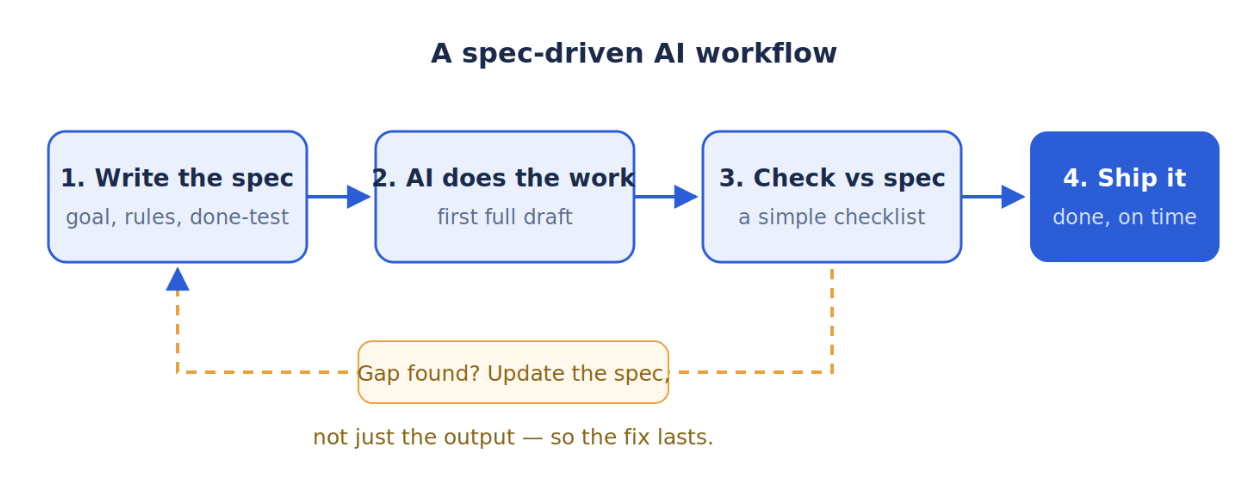
Figure 2 — The loop that makes AI usage scalable.
The anatomy of a good spec
You do not need a twenty-section template to write a spec. For almost any task, from writing a blog post to generating code, the spec can be distilled to five parts. Here is what it looks like.
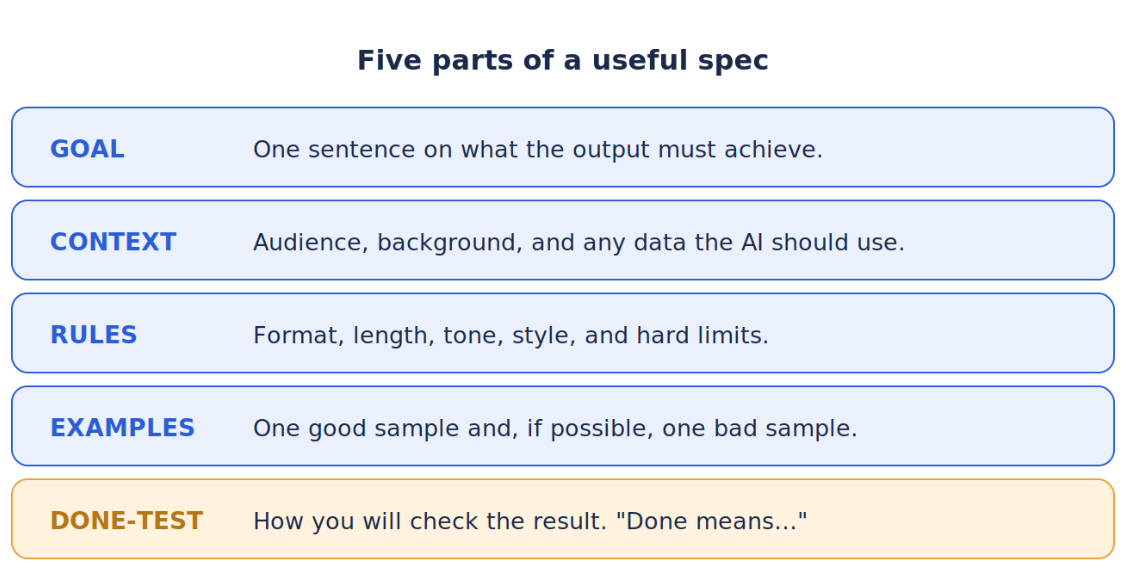
Figure 3 — Five short sections are enough for most tasks. The “done test” is the part people skip most, and miss most.
The done test is the most important part of the spec. It is a statement that describes in simple terms when the result fulfills the requirements. It looks something like this: “Done means the summary is under 200 words, contains all three product lines, and a new team member would not have questions about it.” After writing a done test, you can actually ask the AI to check its own work against it before showing you anything.
A quick example from real life
A small support team uses AI to draft responses to customer support emails. Since every team member writes prompts in their own way, results are all over the place. Some responses are too formal, some are too casual, one response even promises a refund the company is not able to deliver.
Eventually, the team agrees on a short guide that describes the voice they want the customers to hear, the two points every response has to include, the words an AI response should not contain, and the rule about requesting any refunds that have to be approved by a human. The guide is attached to every prompt as a spec.
As a result, response drafts are much easier to review, since they are all consistent. New team members do not spend hours figuring out what the customers actually want to hear, since the knowledge is in the spec, not in their heads. When a mistake happens, it is fixed in the spec, and it is much less likely to happen again. The spec became the shared knowledge of the team — and the team’s shared knowledge became the spec.
Common mistakes to avoid
- Writing a novel. A spec is only useful if people read it. Keep it short enough to scan in one minute.
- Only saying what you want. Saying what you do not want is just as powerful. “No jargon” or “never promise dates” saves many retries.
- Treating the spec as fixed. A spec is a living document. Every failure is a free lesson. Feed it back in.
- Skipping the done test. If you cannot describe what “good” looks like, the AI certainly cannot guess it.
- Hiding specs in one person’s head. Put them somewhere shared, so the whole team benefits and improves them together.
How to start this week
There is no need to introduce any new processes or tools. Pick one recurring task you give to an AI and try writing a spec for it this week. Use the example above for reference.
You can invest ten minutes in writing a five-point spec for almost any task.
Use it for a week, and every time the results are unsatisfactory, add a new point to your spec.
When the weekend comes, ask yourself: how many extra attempts did I have to make before getting a satisfactory result this week?
Most people who try this report that the time spent writing a spec saves them much more time than they invested. A spec grows with you and makes your AI-assisted tasks faster and more reliable with every iteration.
Conclusion
AI tools are getting smarter and more capable every day. However, they are not perfect, and the discrepancy between what one wants and what one asks for is a major source of frustration when working with AI. Specifications are the simplest way to reduce this discrepancy.
A good spec is a solid foundation for an AI-driven task — it codifies your thinking so that an AI can repeat it thousands of times without error.
Teams that adopt this practice see faster progress, more reliable results, and more automation opportunities than those that do not. The opportunity cost of not writing specs is measured in hours and even days of wasted time on “training” the AI.
The best thing about it all is that it is super easy to get started — one task, five bullet points, ten minutes of your time and let the result convince you.