

Introduction: The Need for Centralized Logging
In modern distributed systems, logs have become much more than old text files on a server. They now serve as the core of your infrastructure’s operations.
As organizations adopt microservices, EKS, and serverless architectures, log data comes in from many sources such as EC2 instances, Kubernetes pods, Lambda functions, and Load Balancers. Without a unified strategy, troubleshooting becomes difficult and time-consuming. It often means switching between multiple tools to figure out what happened during an incident.
Although there are large observability platforms available, they often have high scaling costs and use proprietary systems that make it difficult to change solutions in the future.
The good news is that you can create a high-performance, cost-effective alternative using AWS and popular open-source tools. This guide explains how to build a production-ready logging pipeline with Fluent Bit, Amazon OpenSearch, S3, and Athena.
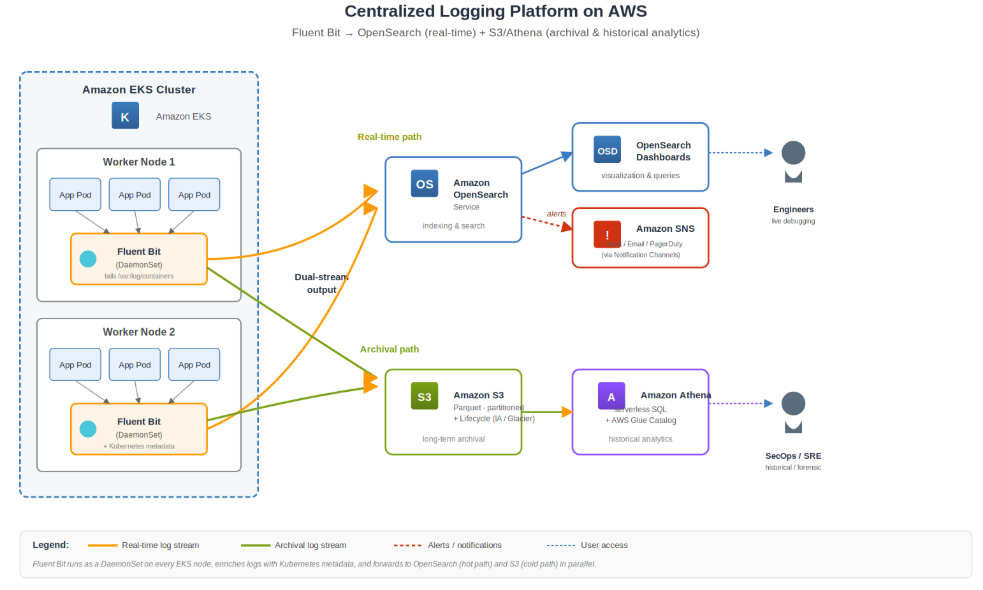
Figure 1: End-to-end architecture, Fluent Bit on EKS streams logs in parallel to Amazon OpenSearch (real-time path) and Amazon S3 (archival path), with Athena for historical SQL analytics and SNS for alerting.
Collecting Logs at Scale with Fluent Bit
One of the biggest headaches in cloud-native environments is trying to grab logs from hundreds of different servers and containers without bogging down the system. That is where Fluent Bit comes in. It’s a super lightweight, high-performance processor designed specifically for these kinds of distributed setups, which is why it’s become the go-to for anyone running Kubernetes on Amazon EKS.
The great thing about using Fluent Bit on EKS is that it usually runs as a DaemonSet. This basically means a collector sits on every single node, automatically picking logs from every container in the cluster. As your cluster grows, your logging scales right along with it—no manual intervention required.
What’s even better is that Fluent Bit doesn’t just dump data in one spot; it can send logs to multiple places at the same time. For the stuff you need to see immediately—like when you’re in the middle of a live troubleshooting session—you can pipe logs into Amazon OpenSearch using secure, IAM-based authentication. At the same time, you can shuttle those same logs over to Amazon S3 for long-term storage. You can do this directly or use Amazon Data Firehose if you want a bit more buffering and better compression to save space.
In the end, this setup gives your team exactly what they need: instant visibility to fix issues on the fly, while keeping a cost-effective, long-term archive for audits or deeper analysis later.
Real-Time Search and Visualization with OpenSearch
Once your logs land in Amazon OpenSearch, they’re ready to search almost instantly. It’s built specifically to chew through massive amounts of data, so instead of digging through endless lines of text, your team can filter and find exactly what they need in real time.
With OpenSearch Dashboards, the whole experience changes. You can actually see your traffic patterns and spot weird application behavior or security red flags as they happen. It completely kills the old way of doing things—no more jumping from server to server or manually grepping through files. Everything is pulled into one view, letting you correlate events across your entire environment and fix issues before they turn into bigger problems.
Long-Term Log Archival with Amazon S3
While Amazon OpenSearch is great for real-time analysis, keeping months or years of logs there is a quick way to blow your budget. As your data grows, the costs for storage, managing shards, and keeping the underlying infrastructure running start to add up fast.
To keep things efficient, the move is to archive those logs continuously to Amazon S3. It is significantly cheaper and built for long-term durability. By compressing the logs and organizing them into partitions or optimized formats, you don’t just save on storage—you also make it much easier and faster to run queries later on without the massive price tag.
Historical Analytics Using Amazon Athena
The best part of this setup is that you don’t have to move mountains of old data back into a search engine just to look at it. With Amazon Athena, you can run standard SQL queries directly against the logs sitting in S3. It makes digging through historical data a lot simpler and, more importantly, keeps your costs from spiraling.
By using the AWS Glue Data Catalog, you can manage your schemas in one place, which lets you run structured queries even on messy, semi-structured logs. This is a lifesaver for security teams who need to investigate an incident from months ago, or for SREs trying to spot long-term performance trends without breaking the bank.
Since Athena works on a pay-per-query model, you only pay for what you actually use. You can get those costs even lower by storing your logs in formats like Parquet or ORC and using partitioning. That way, when you run a search, Athena only scans the specific data it needs instead of digging through your entire S3 bucket.
In the end, combining OpenSearch and Athena gives you the perfect balance. You get OpenSearch for the fast-paced, real-time troubleshooting, and Athena for the deep-dive historical analysis, all without the massive bill that comes from keeping every single log indexed 24/7.
Operational Monitoring and Alerting
Amazon OpenSearch Service also includes a built-in Alerting plugin that helps teams proactively monitor their environments. Engineers can create monitors and triggers based on specific log patterns or thresholds, and whenever those conditions are met — such as a sudden spike in 5xx errors or suspicious activity — alerts are automatically generated.
These alerts can then be sent through Amazon SNS to different notification channels like email, Slack, PagerDuty, or other incident management platforms, helping teams respond to production issues much faster.
Some common alerting scenarios include unexpected increases in application errors, repeated failed login attempts, or even a sudden drop in log ingestion, which could indicate that a log collector or pipeline has stopped working properly.
Scalability, Flexibility, and Cloud-Native Design
What makes this architecture especially powerful is its flexibility and scalability. Fluent Bit efficiently collects and forwards logs with very little resource usage on each node, OpenSearch provides fast search and analytics capabilities, Amazon S3 offers highly durable and scalable long-term storage, and Athena makes it easy to run historical queries whenever needed.
Since each component can scale independently, this setup works equally well for small teams as well as large enterprises processing billions of log events every day. Another major advantage is that the overall solution is built using open-source and CNCF-graduated technologies, giving organizations more flexibility while avoiding vendor lock-in. This allows teams to maintain better control over costs, retention policies, and overall system configuration.
Conclusion
Centralized logging is no longer optional, it’s a necessity for modern DevOps. By pairing open-source tools like Fluent Bit and OpenSearch with AWS services like S3 and Athena, you get a powerhouse observability stack that doesn’t break the bank.
This setup gives you the best of both worlds: OpenSearch for fast, real-time troubleshooting when things go sideways, and S3/Athena for low-cost, long-term storage and historical analysis. It’s a scalable, “no-lock-in” approach that ensures you always have eyes on your production environment without the massive bill of proprietary platforms.