

How modern release patterns and the right cloud services let you push code while users keep using your product.
Not long ago, shipping software meant booking a maintenance window, slapping an apology banner on the site, and hoping nothing caught fire before dawn. Some industries still work that way. Most don’t. For the rest of us, pulling an app offline just to push a release isn’t really an option anymore, users treat uptime as table stakes.
Which is exactly why zero-downtime deployment has become such a core skill for DevOps teams. AWS hands you most of the building blocks already. The harder question is figuring out which mix of services and release patterns actually suits your workload, how much risk you’re willing to absorb, and what kind of capacity overhead you can stomach during a rollout.
This guide walks through the six release patterns most AWS teams reach for, the services that make each one work, and the trade-offs to keep in mind when you pick one.
Six Release Patterns That Avoid Downtime
AWS doesn’t prescribe one “correct” way to deploy without downtime — it gives you primitives, and you compose them. The six patterns below are the ones you’ll see most often in production. They aren’t mutually exclusive; many teams use two or three depending on the service.
- Blue-Green — two parallel environments, swap traffic atomically.
- Rolling — replace the fleet a slice at a time.
- Canary — send a small fraction of real traffic to the new version first.
- A/B Testing — run two versions side by side and let metrics pick the winner.
- Immutable — never patch a server; replace the whole fleet on every release.
- Lambda Versioning & Aliases — for serverless workloads, route between published versions of a function.
Blue-Green: Two Environments, One Switch
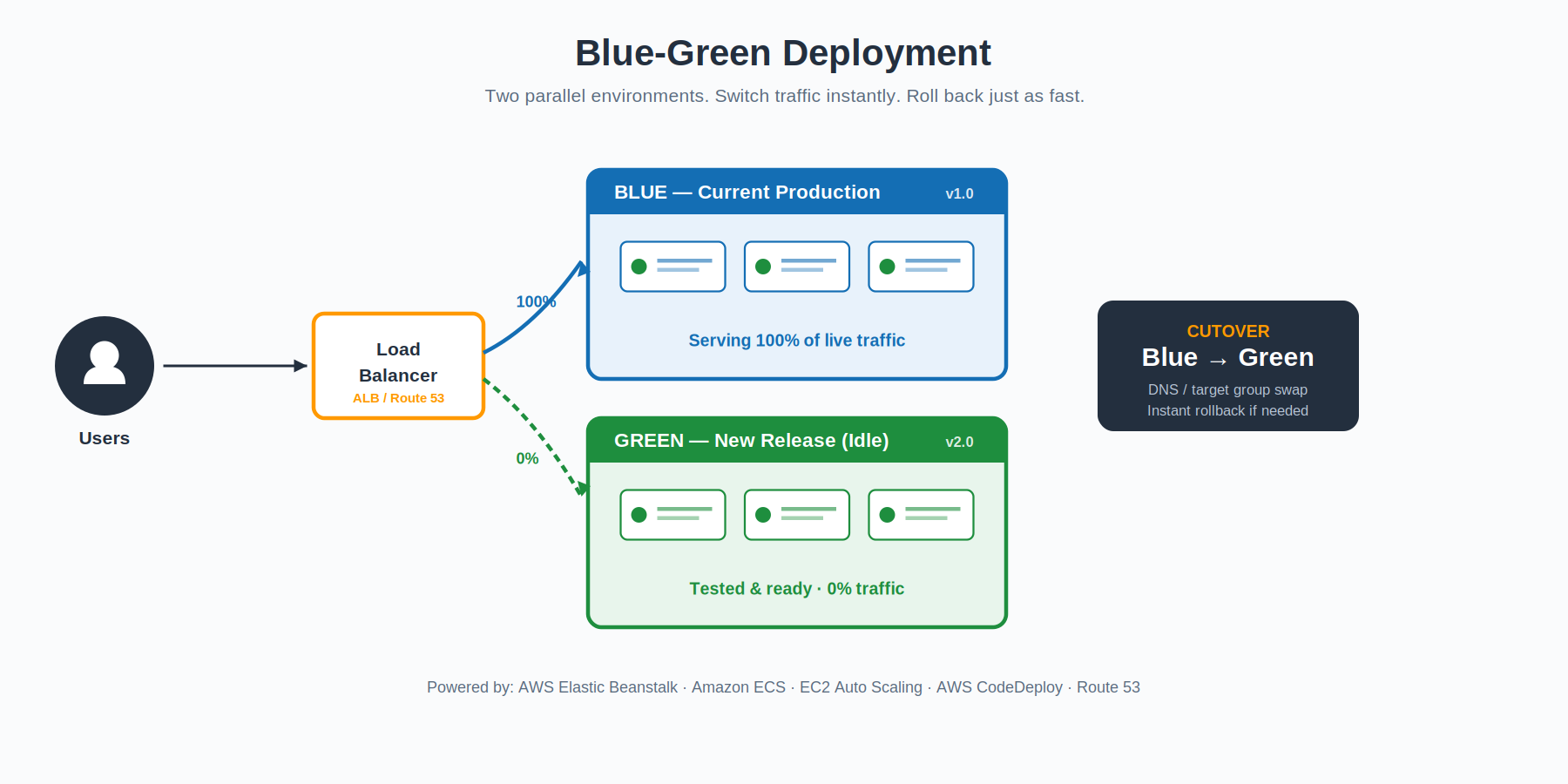
The mental model is simple. You run two complete environments side by side. One of them — call it Blue — is the live one, taking all production traffic. The other — Green — is identical infrastructure, but running the new release. Green stays idle while you run integration tests, smoke checks, and any validation you want against it.
When Green looks healthy, you flip a switch — usually a load balancer target-group swap, an Application Load Balancer listener change, or a Route 53 weighted record update — and traffic moves over. Blue stays running for a while as your safety net. If anything goes sideways in the new environment, you flip the switch back. The rollback takes seconds, not minutes.
On AWS, this pattern shows up natively in Amazon ECS (which now has a built-in blue/green deployment option), AWS CodeDeploy, EC2 Auto Scaling, and Elastic Beanstalk via environment URL swaps. It is the gold standard when you can afford to run two full environments at once.
Best fit: release-sensitive workloads where instant rollback matters more than infrastructure cost.
Rolling: Replace the Fleet a Slice at a Time
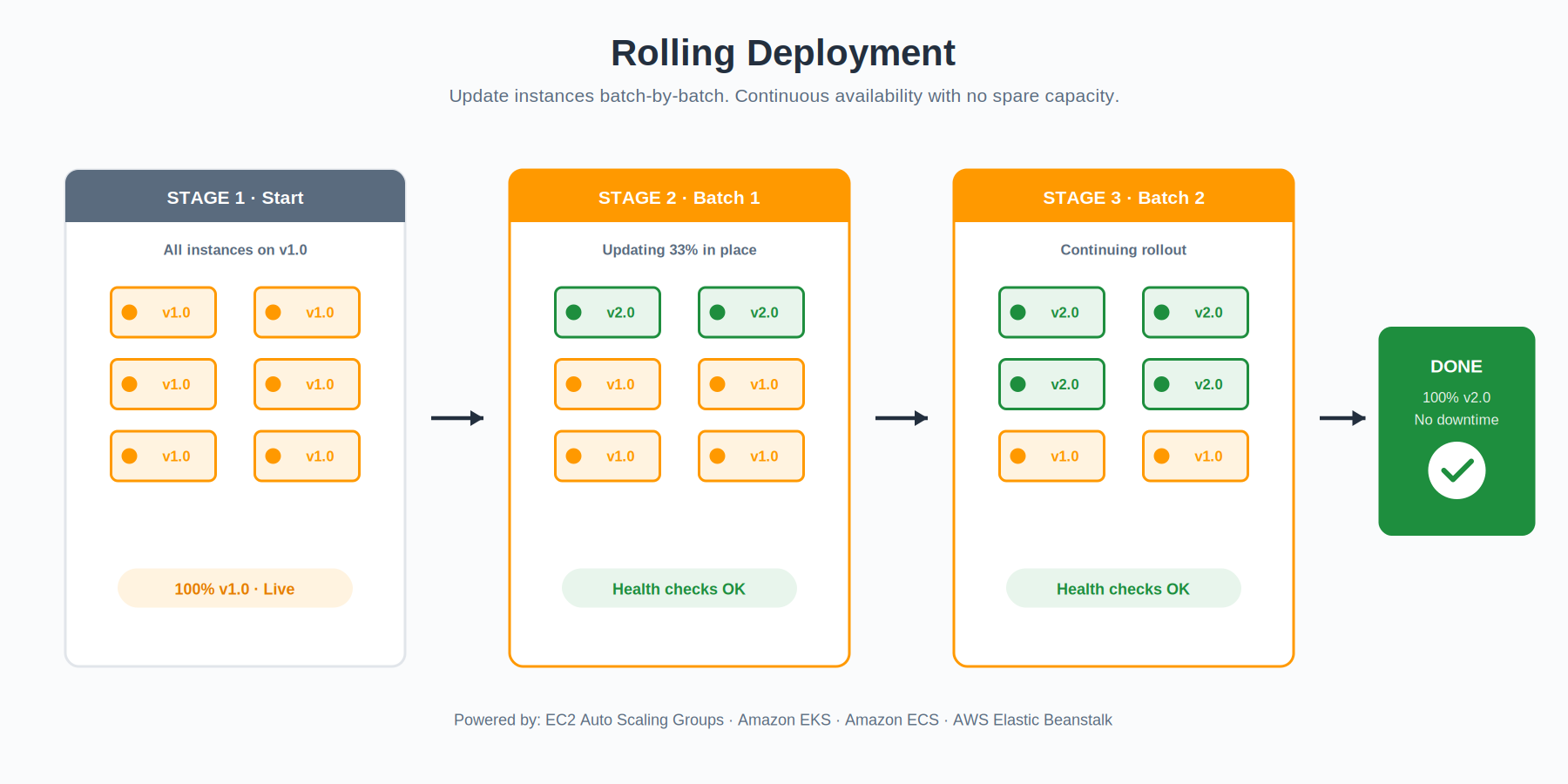
A rolling update treats your fleet as a long line of instances and walks down the line, swapping each one for the new version. You decide the slice size — maybe two instances at a time, maybe twenty percent of the fleet — and AWS handles the rest. Each batch goes through a health check before the next one starts.
What you trade for the simplicity is some capacity. While a batch is rotating out, the rest of the fleet has to absorb its share of the traffic. If your service runs hot, this can hurt. If it runs warm, you barely notice. The blast radius of a bad release is small because you can stop the rollout the moment health checks start failing — the unaffected batches keep humming on the old version.
EC2 Auto Scaling Groups, Amazon EKS, Amazon ECS, and Elastic Beanstalk all support rolling updates as a first-class concept. EKS in particular handles this through Kubernetes-native rolling deployments, with surge and unavailable controls so you can dial in exactly how aggressive the rollout is.
Best fit: cost-sensitive workloads where you can spare some headroom but cannot afford to double the fleet.
Canary: Test in Production Without Risking Production
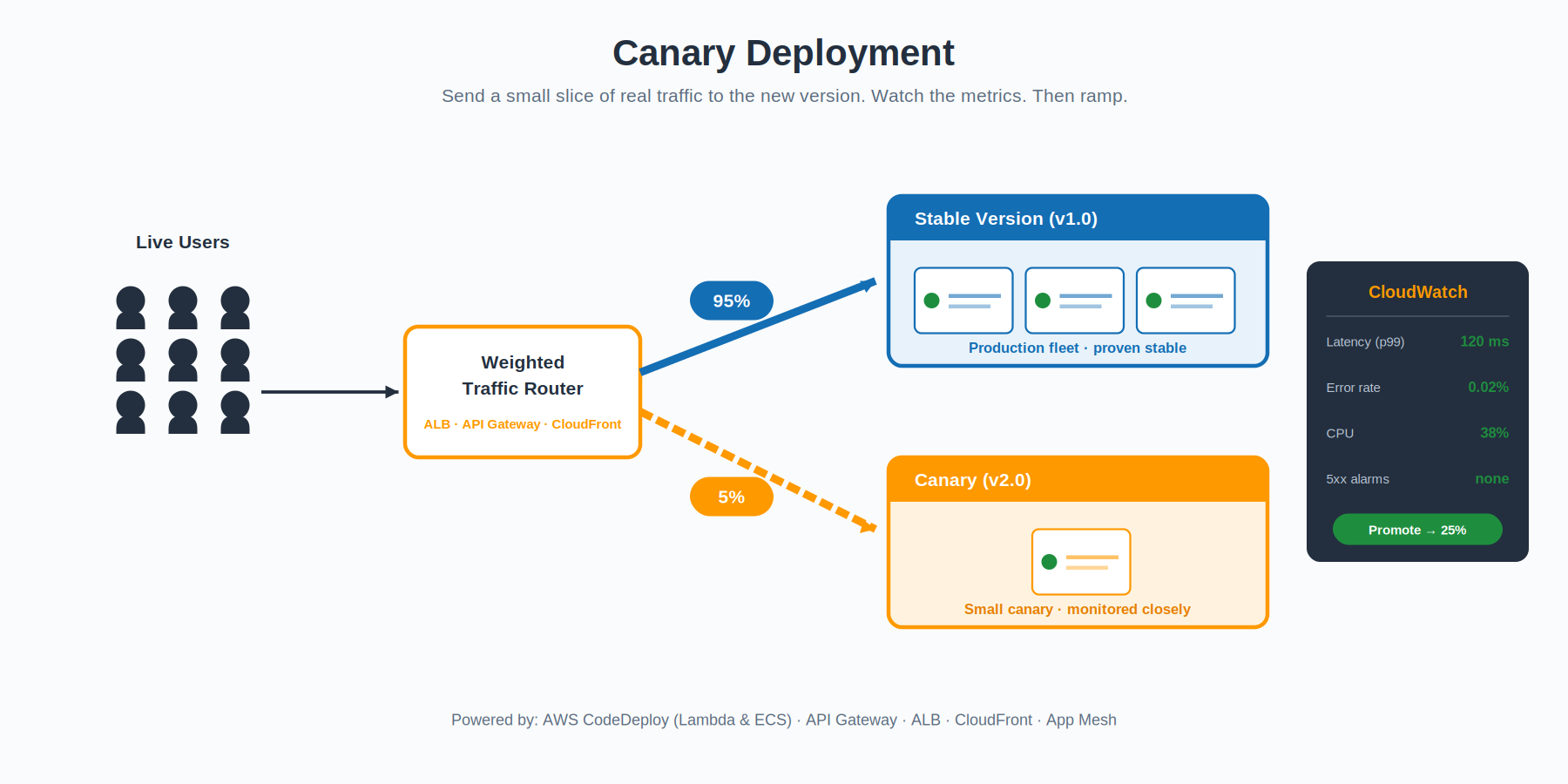
The name is a reference to coal miners taking canaries underground — small birds that would react to dangerous gases before humans did. A canary deployment does the same thing with traffic. You release the new version, but route only a tiny slice of real users to it — usually one to five percent — and watch what happens.
The point is to find problems no test environment can simulate. Real traffic patterns, real concurrency, real edge cases. You watch the canary against your production baseline: error rates, latency percentiles, CPU, memory, custom business metrics. If the numbers stay clean, you ramp the percentage up in stages — five, twenty-five, fifty, a hundred. If they don’t, you cut traffic back to zero and the blast radius is whatever that small percentage represents.
The traffic shifting itself happens at whatever layer makes sense for your stack. Application Load Balancer weighted target groups, Amazon API Gateway stage variables, AWS App Mesh virtual services, and Amazon CloudFront origin groups all support weighted routing. AWS CodeDeploy automates the whole canary lifecycle for AWS Lambda and Amazon ECS workloads — including the CloudWatch alarm integration that triggers automatic rollback when something goes wrong. (Worth noting: for EC2 and on-premises targets, CodeDeploy uses in-place or blue/green deployment types rather than percentage-based canary configurations — that progressive-traffic feature is a Lambda and ECS thing.)
Best fit: high-stakes services where you need real-world validation before committing to a full rollout.
A/B Testing: Let the Metrics Decide
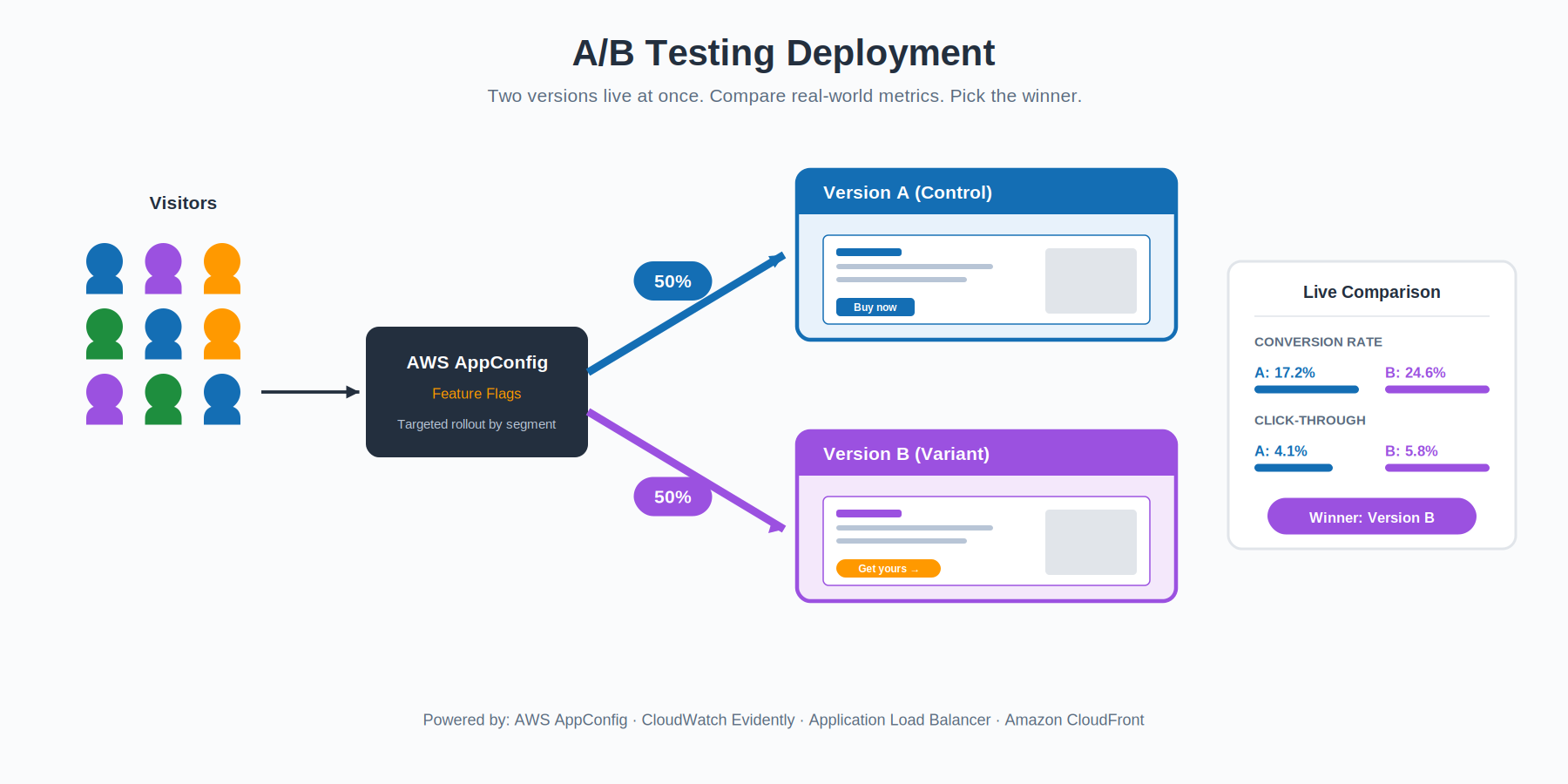
A/B testing looks like canary at a glance, but the goal is different. Canary asks “is the new version safe to roll out?” — a stability question. A/B testing asks “is the new version better than the old one?” — a product question. You run both versions concurrently, often with a fifty-fifty split, and compare business outcomes: conversion rate, click-through, time on page, average order value, whatever matters for your domain.
AWS gives you two tools that fit this naturally. AWS AppConfig lets you ship features behind dynamic flags so you can roll something out to a specific user segment without redeploying anything. Amazon CloudWatch Evidently is a managed service purpose-built for online experiments — it handles the variant assignment, the statistical analysis, and the metrics collection so your application code stays clean.
The deployment side of A/B is essentially solved by the same load balancer or feature-flag plumbing you’d use for canary. The hard part is the experimental design — picking the right metric, running the test long enough to be statistically meaningful, and not fooling yourself with noisy data.
Best fit: product-led teams who want to validate hypotheses with real user behavior, not just technical safety.
Immutable: Never Touch a Running Server
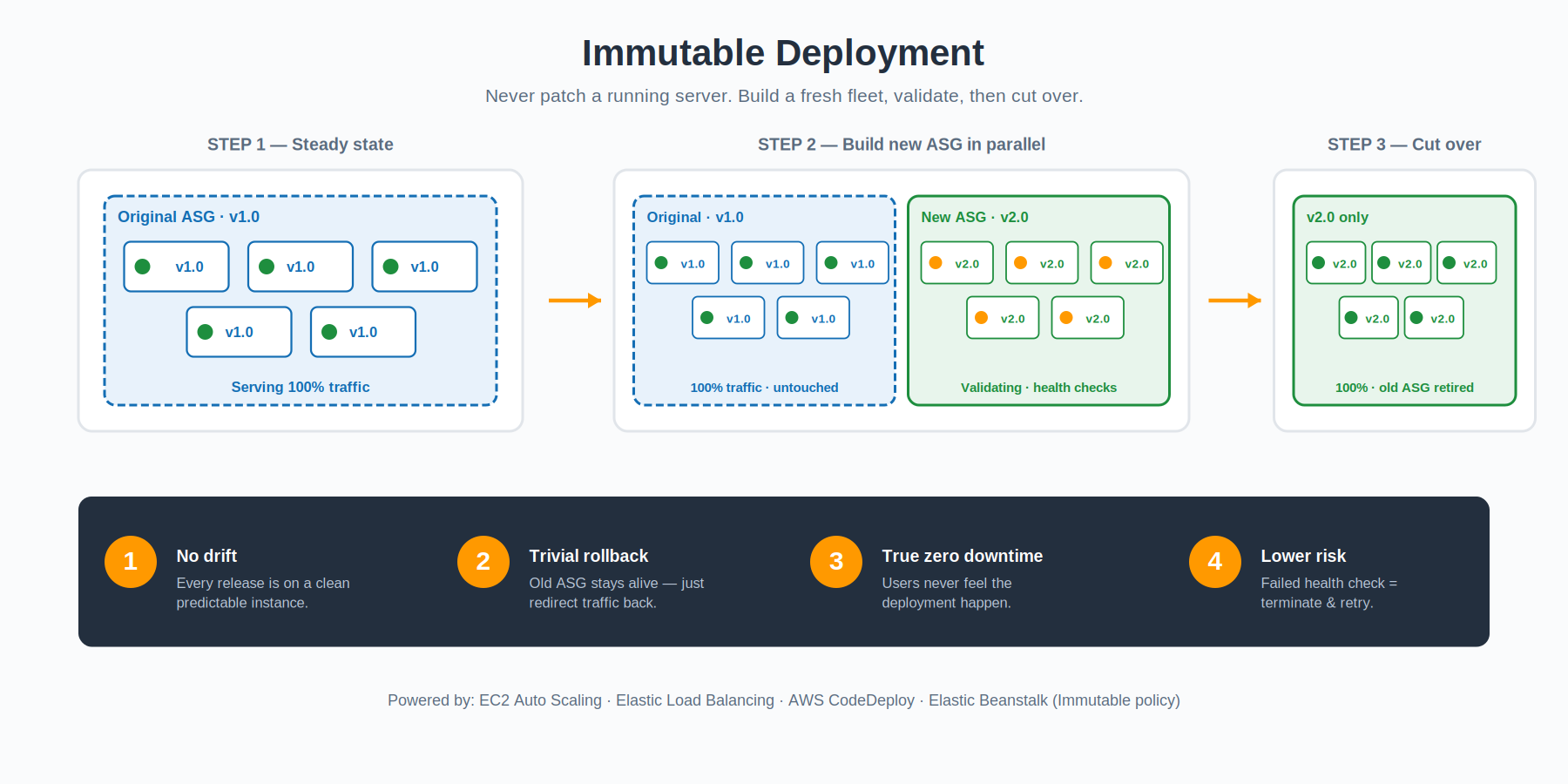 Immutable infrastructure takes a hard line: once a server is running, you don’t change it. Ever. Not for patches, not for config tweaks, not for application updates. If you need a different state, you build a fresh server in that state and discard the old one. The running fleet is, by definition, immutable.
In a deployment context, that means every release provisions a brand-new Auto Scaling Group with the new application baked into the AMI or container image. The new ASG comes up alongside the existing one, registers with the load balancer, and waits for health checks to pass. Once the new fleet is healthy, traffic shifts over and the old ASG is terminated. If something fails the health check, the new ASG simply gets thrown away — the old one was untouched the whole time, so there is nothing to roll back.
The benefit is bigger than just deployment safety. Immutable environments eliminate configuration drift entirely. There is no “well, that server has been running for two years and someone SSH’d into it once” mystery state. Every release is a fresh start. Elastic Beanstalk offers Immutable as a dedicated deployment policy that automates the whole pattern, and CodeDeploy plus EC2 Auto Scaling can do the same thing at a lower level if you want more control.
The cost is real, though. You temporarily double your fleet size during every release, and you spend more time on each deployment because you are launching fresh instances rather than updating existing ones. For workloads where reliability and predictability matter more than deployment speed, the trade is usually worth it.
Best fit: regulated, security-sensitive, or highly reliable systems where configuration drift is unacceptable.
Lambda Versioning & Aliases: The Serverless Special Case
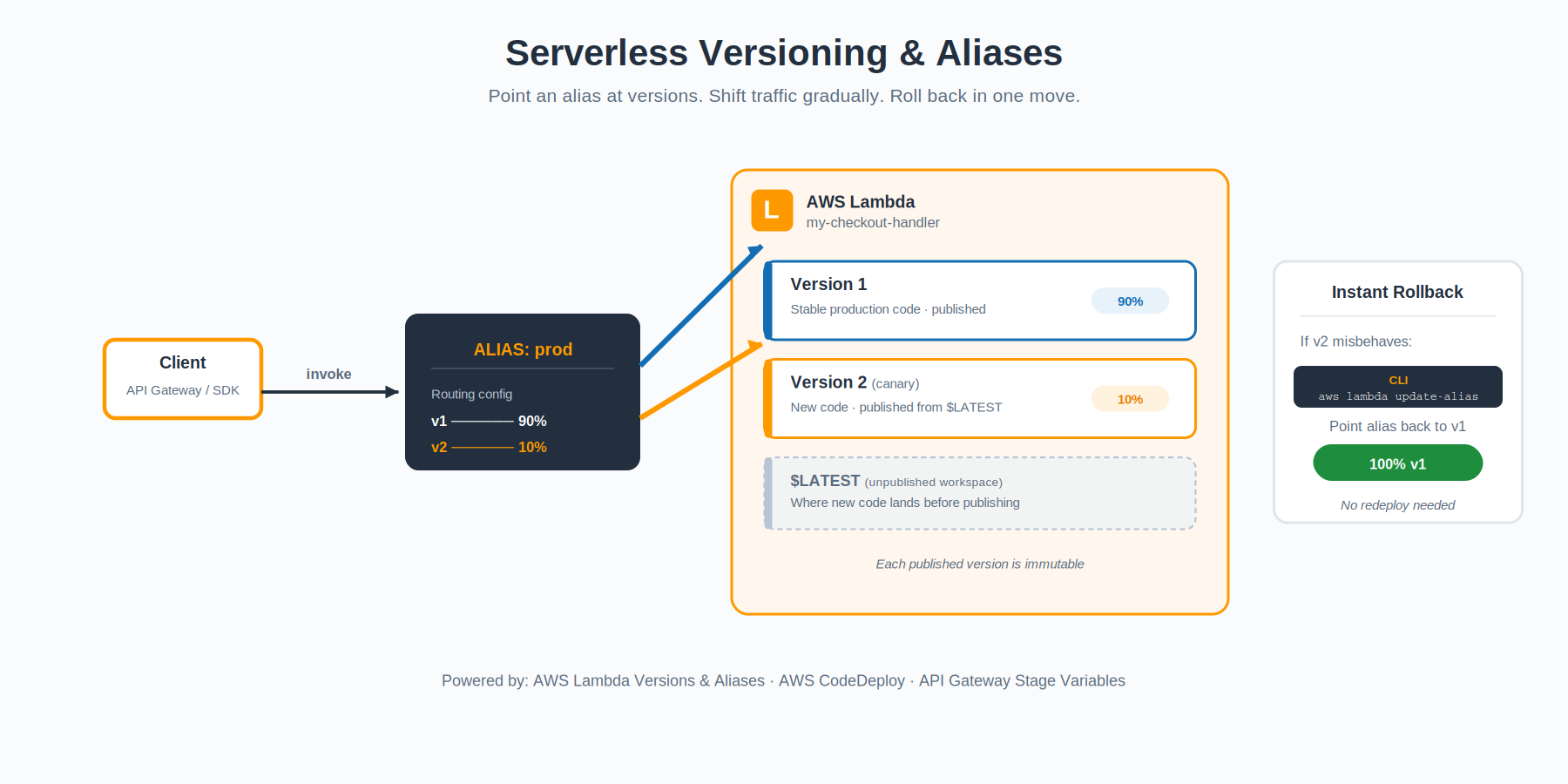
Serverless workloads play by slightly different rules. You don’t manage instances, so the patterns above don’t map cleanly. AWS Lambda has its own primitive: published versions and aliases.
Every time you deploy code, you can publish it as an immutable version of the function — version 1, version 2, version 3, and so on. Each version is frozen; you cannot change it after publishing. On top of those versions, you create aliases — named pointers like “prod” or “staging” that resolve to one or more versions. Clients invoke the alias, not the version directly.
The interesting bit is that an alias can split traffic between two versions with a configurable weight. Want to send ninety percent of traffic to version 7 and ten percent to version 8? One API call. Want to roll back when version 8 misbehaves? Update the alias to point one hundred percent at version 7. No redeploy, no cold start of a new image, no waiting. The change propagates almost immediately.
AWS CodeDeploy can automate this for you with canary, linear, and all-at-once configurations specifically tuned for Lambda. It will manage the alias weights for you, watch CloudWatch alarms during the rollout, and trigger automatic rollback if anything goes wrong — making serverless deployments feel a lot like the canary pattern from earlier in this guide.
Best fit: any production Lambda function. There is essentially no reason not to use aliases in a serverless production deployment.