

The Day When UI Fooled Me
Early in my QA career, I was testing a feature that let users update their profile information.
Everything seemed fine. I changed the user’s phone number and clicked on the “Save” button. The user interface showed a success message. Even after I refreshed the page, the new phone number was still there. From the user’s point of view, everything worked as it should.
Then I verified it in the database. To my surprise, the phone number had not been updated on the user table. The application showed data that it had stored in cache while the actual database still had the old value. If I had only relied on the user interface, I would have missed that defect.
It would have probably made it to production. That was the day I realized something.
“A successful user interface does not always mean the data is correct.”
Why Database Validation Matters
As testers, we spend a lot of time checking buttons, forms, APIs, and business workflows.
Behind almost every feature there is a database that stores the information users need. Whenever a user creates an account, places an order, uploads a document, submits a form, or updates their profile, something changes in the database. If that data is not stored correctly, the application may seem to work. It will actually be raising issues that will appear later on. That is why database validation has become a part of my testing process. Database validation is crucial because it helps us to find problems that we cannot see from the User interface.
You Don’t Need to Be a Database Expert
When people hear about database testing, they often think it is something only developers or database administrators should do. I used to think with the same mindset. The truth is that every manual tester should know the basics of database validation. You do not need to be a master of SQL or understand database architecture. Knowing how to retrieve data and verify it against the software is often enough to catch issues that user interface testing alone cannot. Over time, learning SQL has become one of the valuable skills I have added to my QA toolkit.
Techniques which Use During Database Validation:
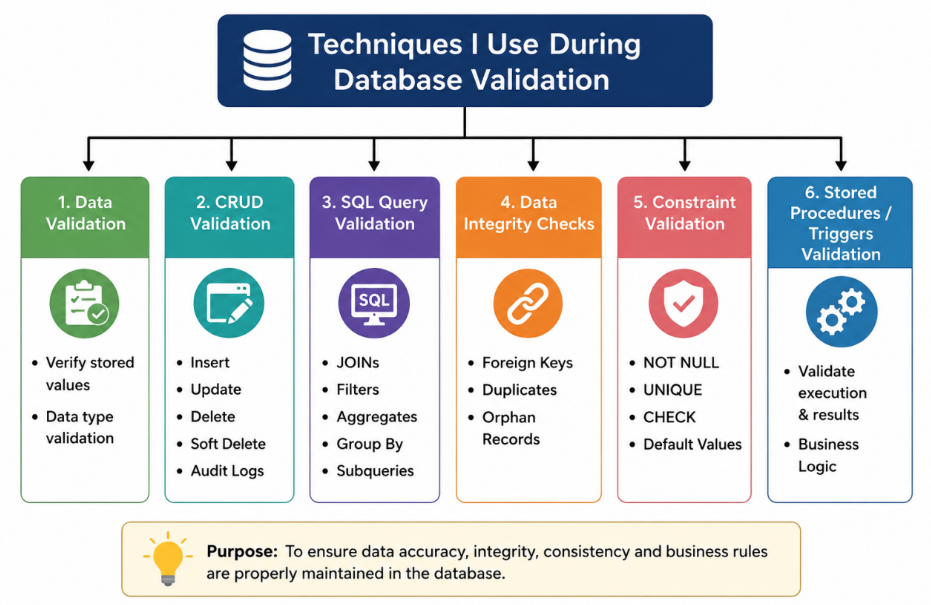
Verify That Data Is Actually Saved
Whenever I test a Create or Update feature, I do not stop after seeing a success message.I always verify whether the database contains what the user entered. I have seen situations where the user interface showed updated information, but the backend never committed the changes.A quick SQL query immediately exposed the problem.
Validate Business Rules
Sometimes the data is saved, incorrectly.
For example, suppose an application automatically calculates discounts.
- The user interface may show the total value.
- Is the calculated value stored correctly in the database?
- Is the discount percentage accurately stored in the database?
- Is the tax amount saved correctly in the database?
These are things QA always needs to verify in the database. QA can verify the database to make sure that the business rules are applied correctly or not.
Check Relationships Between Tables
Nowadays2, modern applications rarely store information in a single table.
Creating one record often involves updates related to multiple tables.
For example, when creating a new Work Order, I usually verify:
- Was the Work Order created?
- Was the mapping table updated?
- Was the audit history inserted?
- Were notification records generated?
Looking at only one table often tells only part of the story. I check the relationships between tables to make sure the data is consistent.
Validate Status Changes
Many applications rely on status values.
- Pending
- Approved
- Completed
- Cancelled
Trusting what is displayed on the screen, QA can verify that the correct status has actually been stored in the database. I have encountered many cases where the user interface showed Status as “Completed” while the database still contained “Pending” Status.
Those inconsistencies can cause bigger issues later.
Check Timestamps
Timestamps are easy to overlook. They are incredibly important.
Whenever records are created or updated, I verify.
- Was the correct timestamp recorded?
- Was it updated after the latest action?
- Is the time zone correct?
- Is the audit history accurate?
Small timestamp issues can create major reporting problems.
Verify Delete Operations Carefully
Deleting a record is not always as simple as removing it from the database. Sometimes applications perform a delete by marking the record as inactive. At times they remove related records as well.Understanding the expected behavior helps ensure nothing is accidentally left behind or deleted when it should not be.
Database Validation Helped QA Find Bugs, but the UI Never Revealed
Some of the interesting bugs QA have reported were not visible on the screen.
- Found duplicate records that users never noticed.
- Discovered missing relationships between tables.
- Caught incorrect status updates.
- Identified records that were partially saved because the background process failed.
None of these issues would have been detected by user interface validation alone.
That’s why I always remind new testers:
The UI tells you what the application wants you to see. The database tells you what actually happened.
Database validation is crucial to find bugs that’re not visible on the user interface.
SQL Isn’t About Memorizing Queries
One mistake many beginners make is trying to memorize dozens of SQL commands. I do not think that is the approach. What’s more important is understanding what you want to verify. Once you know that, even simple SQL queries can answer questions.
In my day-to-day testing, I use `SELECT` `JOIN` `COUNT` `GROUP BY` and a few filtering conditions more often than complex SQL.
Understanding the data is more valuable than writing complicated queries.
Final Thoughts
Manual testing is much more than clicking buttons and checking screens.
The more experience I gain, I realize that good testers look beyond what is visible.
Database validation has helped me understand applications better, uncover hidden defects, and gain confidence that features work not just on the surface but behind the scenes as well.
If you are a manual tester and have not started learning SQL yet I would encourage you to give it a try.
You do not need to become a database expert overnight.
Start with queries.
Explore how your application’s data is stored.
The more you understand the data, the stronger your testing skills will become.
Sometimes the valuable bugs are the ones your users never get the chance to see because you found them first.