A practitioner’s walkthrough of building observability for containerized workloads
TL;DR
Container logs in Kubernetes are ephemeral by design — centralizing them is non-negotiable in production.
Fluentd as a DaemonSet collects logs from every node with no per-app changes required.
Kubernetes metadata enrichment is what turns raw text into searchable, useful data.
Index Lifecycle Management (ILM) keeps storage costs and query performance under control.
The hard parts aren’t the architecture — they’re multiline logs, backpressure, and resource limits.
Introduction
Kubernetes makes a lot of things easier. Logging is not one of them.
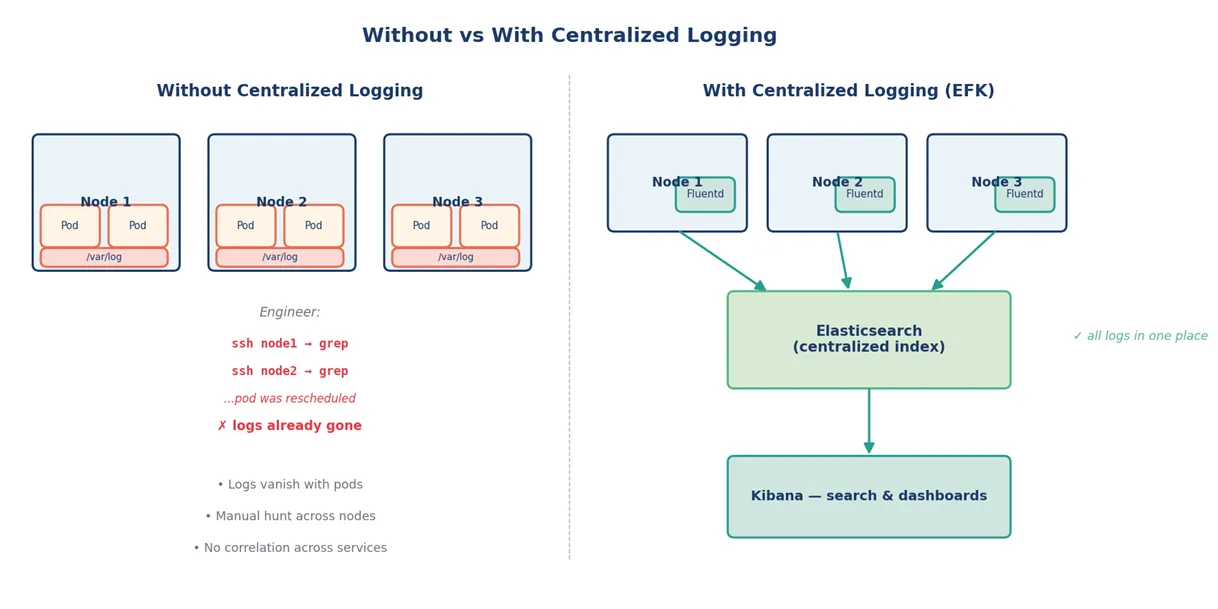
When you go from a small fleet of long-running VMs to a cluster of hundreds of pods that come and go, the assumptions baked into traditional logging fall apart. Logs vanish with the pod that wrote them. SSH-ing into a node to grep through files works exactly until you realize the pod you cared about ran on a different node yesterday and got rescheduled three times since. By the time the third on-call ticket of the week mentions “can someone check the logs,” it’s clear the platform needs something better.
This post walks through how I implemented centralized logging on Kubernetes using the EFK stack — Elasticsearch, Fluentd, and Kibana. I’ll cover what the architecture looks like, the configuration that mattered, and the gotchas that took the most time to get right.
Why “Centralized” Isn’t Optional in Kubernetes
Pods are ephemeral. The kubelet rotates container logs by default at around 10 MB and keeps a small number of older files. The moment a pod is deleted — which happens regularly during deployments, scaling events, or even node maintenance — its logs go with it unless something has already shipped them off the node.
A few specific Kubernetes characteristics make this worse:
Pods can land on any node, so log location is a moving target.
Replicas of the same Deployment write logs that need to be correlated, not searched separately.
Init containers and sidecars produce their own log streams that often matter for debugging.
Cluster-level events (scheduling failures, OOM kills) live separately from pod logs.
Figure 1 — The cost of relying on node-local logs versus centralizing them.
The EFK Stack at a Glance
The EFK stack is one of the standard answers to this problem. Three components, each doing one job well:
Elasticsearch — stores logs in indices optimized for search and time-based queries.
Fluentd — collects logs from every node, parses them, adds context, and forwards them to a backend.
Kibana — gives engineers a UI to query, filter, and build dashboards on those indices.
A note on alternatives
Fluent Bit (the lighter, faster sibling of Fluentd written in C) has become a common choice for resource-constrained clusters. OpenSearch is the open-source fork of Elasticsearch that emerged after the 2021 license change. The architecture below applies almost identically with those substitutions — the responsibilities don’t change, just the implementations.
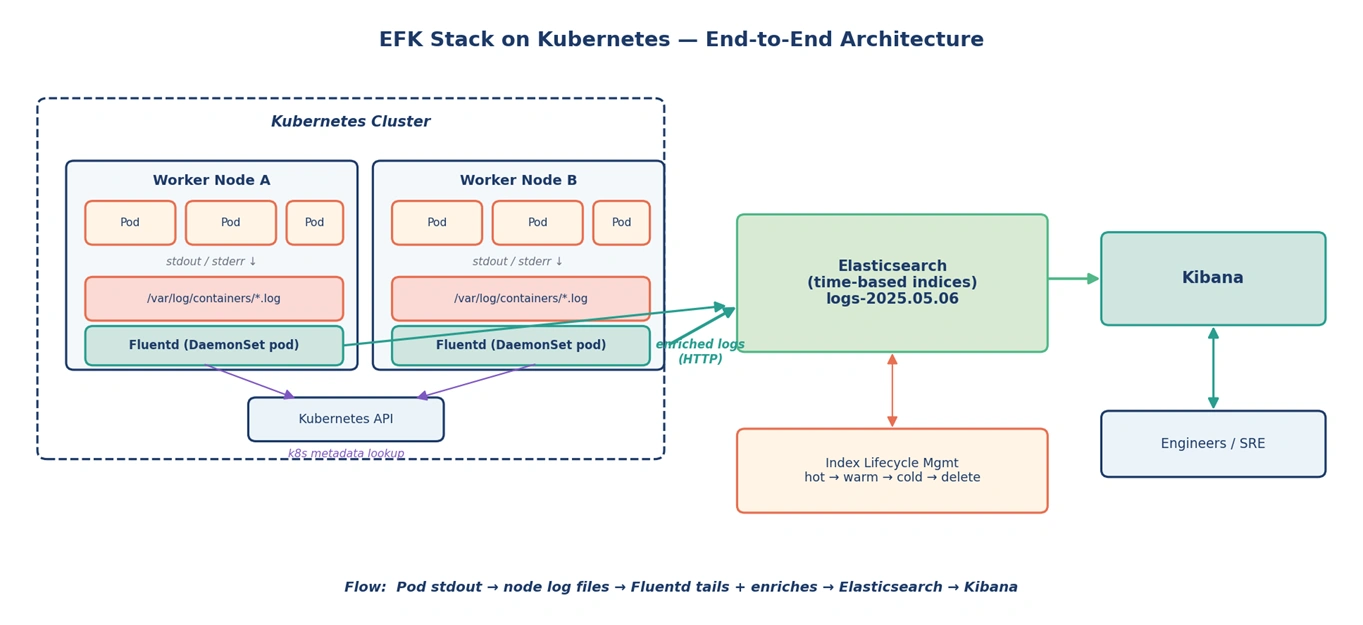
Figure 2 — The full pipeline: from pod stdout to Kibana, with metadata enrichment along the way.
Designing the Log Pipeline
The flow we settled on:
The application writes to stdout/stderr — 12-factor style, no log files inside the container.
The container runtime captures those streams to /var/log/containers/<pod>_<ns>_<container>-<id>.log on the node.
The Fluentd DaemonSet — one pod per node — tails those files.
The fluent-plugin-kubernetes_metadata_filter enriches each line with namespace, pod name, labels, and container name.
Fluentd forwards enriched logs to Elasticsearch over HTTP.
Kibana queries Elasticsearch for search and dashboards.
The key insight: applications don’t need to know logging exists. They write to stdout. The platform handles the rest. That separation is what makes centralized logging scalable — it’s a platform concern, not an application concern.
Why DaemonSet (and What to Watch For)
A DaemonSet is the right primitive here. It guarantees one Fluentd pod on every node, including new nodes added by the cluster autoscaler. No manual provisioning, no missed nodes.
Three things matter in practice:
Tolerations
By default, DaemonSets don’t run on tainted nodes (control plane, GPU pools, dedicated workload nodes). If you want logs from those, you need explicit tolerations.
Resource limits
Fluentd is a Ruby process and can spike memory under heavy log volume. Set conservative requests and reasonable limits — too low, and you’ll OOMKill the very component that’s supposed to tell you why the pod next door crashed.
hostPath mounts
Fluentd needs to read /var/log and the symlinked container log directory (/var/lib/docker/containers or /var/log/pods/, depending on container runtime). It runs with the appropriate hostPath volumes.
Raw container logs are nearly useless on their own. A line like ERROR: connection refused tells you nothing about which pod, namespace, or service produced it. The kubernetes_metadata filter fixes this by hitting the Kubernetes API to attach context to every log event:
Pod name and namespace
Container name
Pod labels — the gold for filtering by app, version, environment
Figure 3 — Each log line is parsed, enriched with cluster context, filtered, and forwarded.
Storage, Indices, and Lifecycle
Elasticsearch happily eats logs at almost any volume. The challenge is keeping it from being eaten by them. Three things prevent runaway storage growth:
Time-based indices
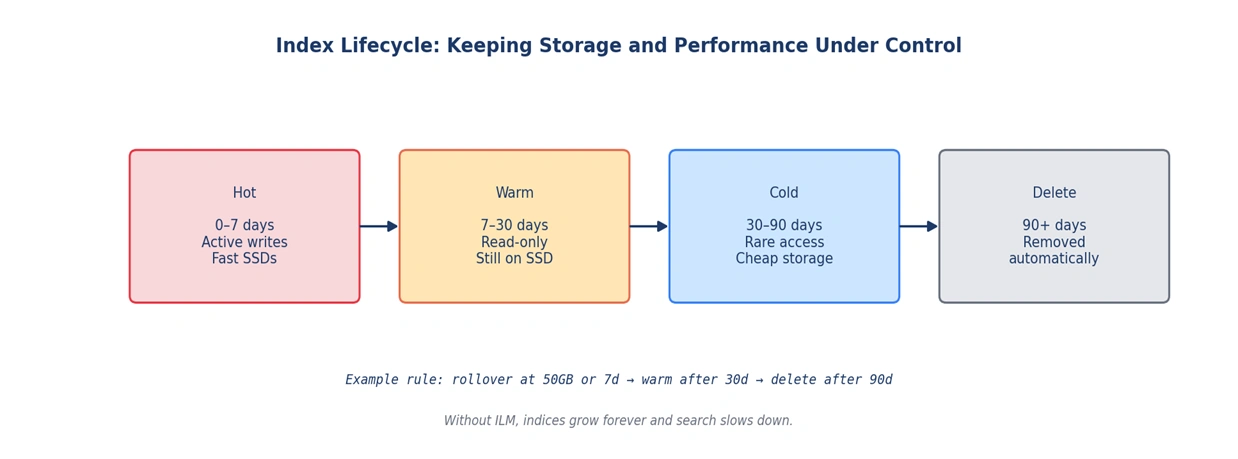
Index names like logs-2025.05.06 (instead of one giant logs index) make rollover and deletion straightforward. Old indices can be deleted as a single operation rather than running expensive delete-by-query.
Index Lifecycle Management
Elasticsearch can automatically transition indices through hot, warm, cold, and delete phases based on age or size. Hot is for active writes on fast storage; warm is for read-only but still queryable indices; cold sits on cheaper disks; and delete removes the data entirely.
Sensible retention
Most teams don’t need 90 days of debug-level logs in fast storage. A common starting point is 14 to 30 days hot, with longer retention in cold storage if compliance requires it. Adjust based on actual query patterns, not aspirations.
Figure 4 — Without ILM, indices grow forever. With it, retention and tiering become a config rather than a chore.
Kibana for the Day-to-Day
Kibana is where most engineers actually live. The search bar accepts KQL queries that compose well with the metadata Fluentd added:
					# Find timeout errors in the payments namespace
kubernetes.namespace_name : "payments" and message : "timeout"

# Errors only, grouped by app label
kubernetes.labels.app : * and log.level : "ERROR"
Discover view is for ad-hoc investigation. Dashboards are for known patterns — error rate per service, top noisy pods, message processing latency. A few that consistently earned their keep:
Service health overview — errors per service over time
Deployment correlation — logs filtered around deployment timestamps
Message-flow dashboards — producer and consumer logs side by side for systems like RabbitMQ
This is where MTTR drops the most. Going from “let me ssh to the node” to “type the query” cuts incident investigation by orders of magnitude.
Gotchas I Wish I’d Known Earlier
A few things took longer than expected to get right. They’re worth flagging because they tend to bite in production rather than in test.
Multiline logs
Java stack traces and Python tracebacks span many lines. Without a multiline parser configured, each line becomes its own searchable record, which fragments the trace and breaks correlation. Fluentd has multiline plugins, but the regex needs to match the actual output format of the application.
Backpressure
When Elasticsearch is slow or unavailable, Fluentd buffers locally. Without buffer limits, that buffer can fill the node’s disk and impact every workload running there. Configure buffer size, retry settings, and chunk limits explicitly — don’t rely on defaults.
Time fields
Container runtimes emit timestamps in different formats. If Fluentd doesn’t parse them correctly, your logs will sort by ingestion time rather than the actual event time. Most of the time this looks fine — until the day you correlate two events and they appear in the wrong order.
Index templates
Define index mappings up front. If you let Elasticsearch auto-detect field types from the first document it sees, you’ll regret it the day a field is sometimes a number and sometimes a string. Mapping conflicts are painful to fix retroactively.
What Centralized Logging Actually Changed
The before-and-after picture for the team and platform:
Area
Before
After
Log access
SSH into individual nodes, grep through files
Single Kibana query across all pods and nodes
Pod lifecycle
Logs lost when pods are deleted or rescheduled
Logs preserved centrally, independent of pod lifetime
Service correlation
Manually piecing together logs from each replica
Filter by app label, namespace, or trace ID
Incident response
Hours of context-gathering before fixing
Minutes from alert to relevant log line
Compliance / audit
Inconsistent retention, hard to demonstrate
Time-bounded retention via ILM, queryable history
Developer access
Required node-level shell access
Read-only Kibana dashboards by namespace
Lessons Worth Carrying Forward
A few principles emerged from this work that hold up across stacks and clusters:
Logs are platform infrastructure, not an application concern.
Metadata enrichment is the difference between “here are some logs” and “tell me what happened.”
Plan for the day the logging backend goes down — applications shouldn’t notice.
ILM is mandatory at scale, not optional.
The cheapest log is the one you didn’t ingest. Filter aggressively at the source.
Closing Thoughts
Building observability isn’t about adopting a stack. It’s about giving the team the ability to answer “what just happened?” in seconds instead of hours. The EFK stack is one path to that capability, and a well-proven one. Whatever components you choose, the goal stays the same — turn the noise of a thousand pods into a signal you can act on, and make it cheap enough that everyone reaches for it instead of avoiding it.
Devi Desu
As a CloudOps and DevOps Engineer, I specialize in building and managing scalable cloud-native infrastructure across AWS environment. My experience includes implementing centralized logging and observability solutions using the EFK stack, enhancing production reliability through AWS monitoring and automation, and streamlining cloud operations with modern DevOps and infrastructure automation practices. Passionate about cloud technologies and operational excellence, I continuously work towards building reliable, scalable, and efficient infrastructure solutions for modern applications.
The blueprint for the AI-native enterprise, delivered to your inbox.