

Let’s address the massive, glowing red problem sitting right in the middle of the enterprise tech landscape.
Enterprises are rushing to adopt AI assistants and automated agents. Leadership wants efficiency. Product teams want speed. Everyone is convinced that generative AI will revolutionize how work gets done, from summarizing support tickets to automating code deployment.
The catch?
Out of the box, that incredibly smart model is totally, completely blind to the very things that actually run your business. It can’t see your messy Postgres databases. It has zero clue what’s buried in your chaotic Jira boards. Your team’s endless Slack channels? Invisible.
To deliver actual business value, AI cannot live in an isolated browser tab. It needs direct, secure access to your enterprise data and operational applications. Until very recently, fixing this disconnect was an absolute nightmare. A migraine-inducing, resource-draining slog. I’ve watched engineering teams lose weeks of sleep trying to build custom, fragile API connectors just to get a chatbot to read a simple internal policy document.
It stinks. It’s unsustainable.
Enter the Model Context Protocol (MCP).
Think of it as the USB-C port for the AI era. Instead of forcing your developers to build a bespoke, highly breakable bridge for every single application your company uses, MCP gives your AI a standardized, universal set of hands. It allows the model to reach out, grab the exact data it needs, and pull it in. Safely. Securely.
Let’s break down why this is changing everything, without getting lost in the technical weeds.
The Real Enterprise Challenge: The Architecture of Disconnect
Let’s ground this in a reality we’ve all faced. Imagine it’s 2 AM, a production service is spiking, and an engineer is frantically trying to triage the incident with an AI copilot.
They type: “What changed in the staging environment, and are there any open Jira tickets related to database latency?”
For the AI to answer this, it needs to be a polyglot that speaks the native languages of three entirely different, siloed systems:
- The Code Repository (GitHub): It needs to query commit logs for recent code changes.
- The Project Management Tool (Jira): It needs to filter tickets for specific keywords.
- The Metrics Database (Postgres): It needs to execute a historical query on performance logs.
In the pre-MCP world, this is a developer’s worst nightmare. You aren’t just building an AI application; you are forced to build a fleet of custom middleware “bridges” to get the AI inside your firewall.
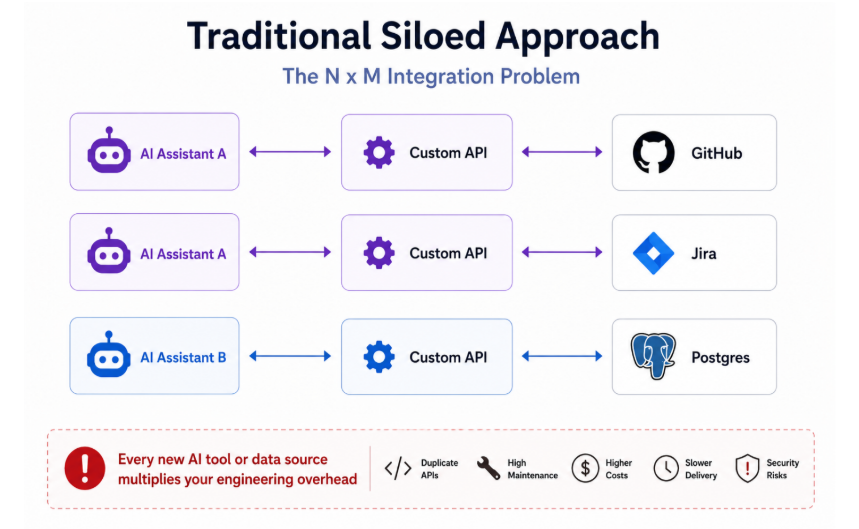
Figure 1. Every AI assistant needs its own custom API for every system, creating duplicate integrations that are costly, slow, and hard to secure.
You’re staring down the barrel of the dreaded “N x M integration problem.” If you have 5 AI tools and 20 internal data sources, that’s 100 individual, brittle connectors you have to build, secure, authenticate, and maintain.
If one API schema changes-say, Jira updates their endpoint-the bridge snaps. Your AI goes blind. The engineer at 2 AM gets a hallucinated answer, or worse, an error code. It is a fragile, resource-draining architecture that essentially guarantees your AI will break as fast as your internal tools evolve.
MCP stops this cycle of insanity by replacing those bespoke bridges with a standardized, universal port. Instead of managing a hundred fragile pipes, you build one MCP-compliant server for each data source, and every AI client can plug into it immediately.
Enter MCP: An Emerging Standard
This is the gap that the Model Context Protocol (MCP) and similar standards are designed to close. Rather than a bespoke bridge for every application-to-system pairing, MCP gives AI assistants a standardized way to discover and use the tools and data they need – a bit like a common port that different devices can all plug into.
Instead of forcing developers to build a one-off connector for every application, MCP lets an AI reach out through a consistent interface, retrieve exactly the data it needs, and act on it – safely and securely. It’s one of several approaches enterprises are evaluating today, and it’s gaining traction quickly because of how directly it addresses the N x M problem.
Zooming out, here’s roughly where MCP sits in a broader enterprise AI architecture:
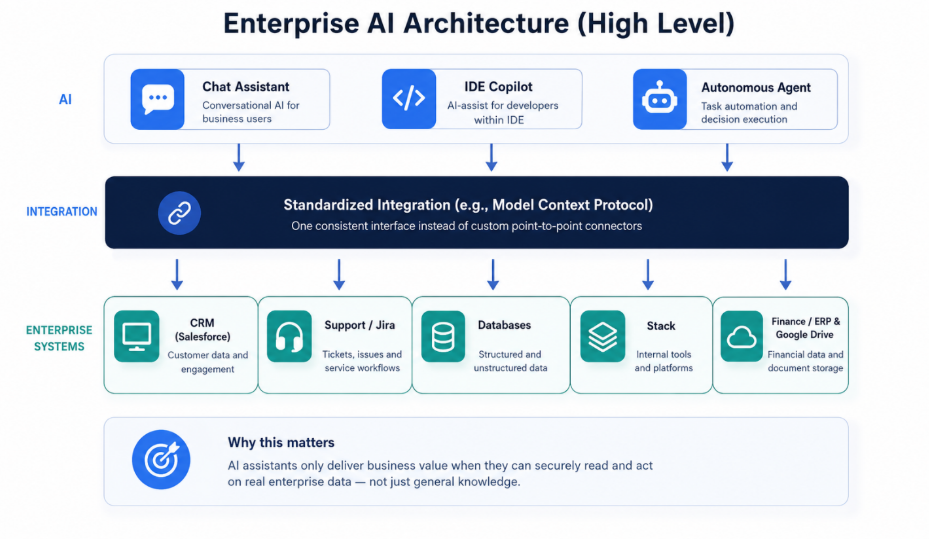
Figure 2. AI assistants sit on top of a standardized integration layer, which connects out to the enterprise systems that hold real business data.
How MCP Works: Architecture and Request Flow
The architecture behind MCP is surprisingly elegant. It relies on a classic client-server model, but optimized specifically for large language models.
At a high level, the system consists of three architectural components:
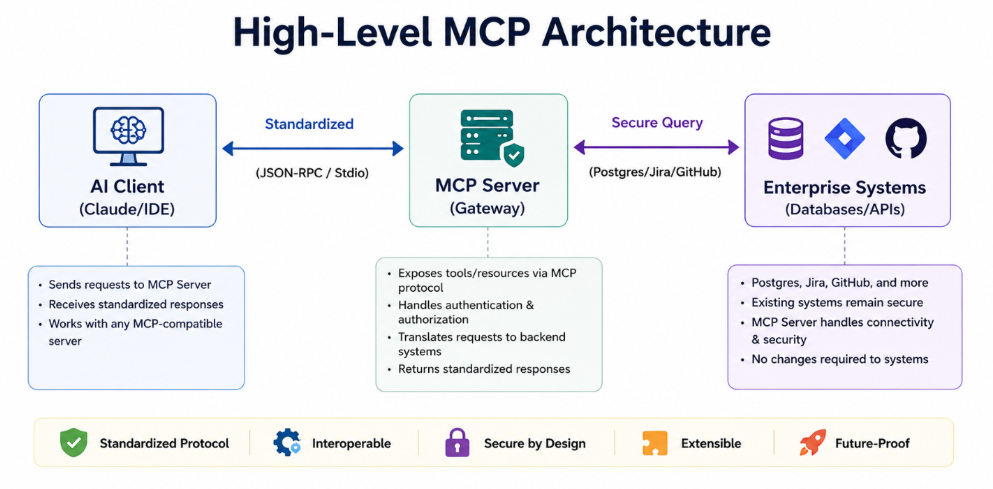
Figure 3. MCP connects an AI Client to enterprise systems through a standardized MCP Server, so no existing system needs to change.
- The Client: Your AI application-let’s say the Claude desktop app, Cursor, or an internal enterprise developer tool-acts as the MCP Client.
- The Server: A lightweight, highly secure program running right alongside your local data source acts as the MCP Server.
- Enterprise Systems: Your underlying data layers (Postgres, Slack, Jira, internal microservices).
The Request Flow in Action
When an engineer asks the on-call copilot about the 2 AM incident, here is how the request flows through the MCP architecture:
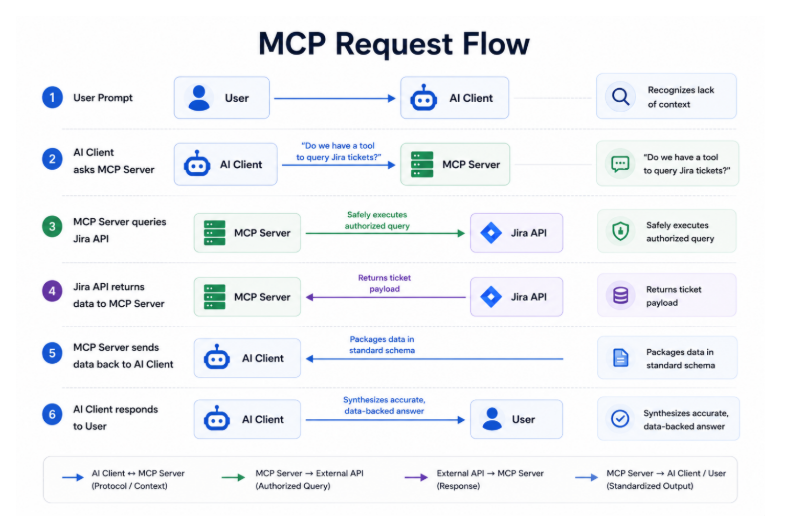
Figure 4. A user’s question triggers a six-step round trip – from AI Client to MCP Server to the Jira API and back – resulting in an accurate, data-backed answer.
When the AI realizes it lacks context to answer the question, it doesn’t panic and hallucinate a fake answer. Instead, it checks in with the MCP Client. The Client pings the registered MCP Servers. The Jira MCP Server says, “Yep, I can run that query.”
The Server safely executes the search, grabs the specific ticket data, packages it up in a standardized format, and hands it back to the model. Boom. Context achieved. No more copying and pasting sensitive spreadsheets into a public web prompt. Thank god.
Security First, Not an Afterthought
Now, I know what the security team is thinking right now.
“You want to give an unpredictable AI direct access to our core databases? Are you out of your mind?”
This is where MCP truly shines. It isn’t just about connectivity; it is about rigid, uncompromising control.
When you set up an MCP Server, the AI doesn’t get a master key to your entire digital kingdom. You define exactly what tools and resources the Server can expose. If you want the AI to only read specific tables in a database, but never write or delete data? You configure the Server for read-only access.
Furthermore, the protocol handles authentication and authorization beautifully. The AI operates with the exact same permissions as the human user querying it. If Bob in accounting doesn’t have access to the HR files, the AI working on behalf of Bob won’t be able to access the HR files through MCP, either. It honors your existing Role-Based Access Control (RBAC) systems, forcing the AI to play by the rules you already set up.
The Three Pillars of MCP
When you look under the hood, the protocol standardizes three distinct things:
- Resources (The “Read” Function): This is how the AI gets information. An MCP Server can expose specific files, database queries, or API endpoints as “Resources.” The AI can pull these in to understand context. Think of it as giving the AI a very specific reading list.
- Tools (The “Action” Function): This is where it gets fun. Tools are executable functions. You can allow the AI to do things. Send an email. Create a Jira ticket. Deploy a server. The AI formulates the request, but the MCP Server actually executes it, keeping the logic and the execution safely separated.
- Prompts (The “Workflow” Function): Servers can also store predefined prompt templates. This ensures the AI behaves consistently for specific, repeatable tasks within your organization.
An Open Ecosystem is Exploding
The absolute best part of this entire protocol? It is an open standard. Anthropic might have introduced it, but they open-sourced it immediately. It is built for everyone to use, regardless of which underlying model you prefer.
Because it’s an open standard, we are already seeing a massive community effort. You don’t have to build these servers from scratch. Pre-built, community-vetted MCP servers are currently available for:
- GitHub and GitLab
- Slack
- Google Drive
- PostgreSQL, MySQL, and Neo4j
- Puppeteer (for web scraping)
Major enterprise players are already throwing their weight behind it, integrating MCP into their enterprise architectures. It is rapidly becoming a leading standard for structured AI-to-data integration.
The Bottom Line
We are moving past the era of the isolated AI.
You aren’t just chatting with a disconnected brain in a jar anymore. Through the Model Context Protocol, you are giving that brain a highly secure, heavily restricted set of keys to your office. It can read exactly what you tell it to read, precisely when you tell it to read it.
It changes the whole game.
If you are trying to build enterprise AI applications right now and you aren’t looking at protocols like MCP, you are doing it the hard way. You are building custom N x M integrations that will inevitably break under production scale.
Give it a try. Spin up a local MCP server for a staging database. Connect your AI workspace client to it. Watch what happens when the model actually knows your data.
Your engineering team will thank you. Or, at the very least, they’ll complain significantly less during the morning standup.