

How It Usually Starts
Let’s say a team is working on a project. Everybody knows where everything is, mostly because there’s only “one” of everything. Then the product takes off, somebody spins up a second app (an admin dashboard, usually), and it gets its own repo without much thought, because, well, that’s just what you do.
And that’s fine for a while. Now there is a requirement, the dashboard needs the same button as the main app already had, so naturally, the developer just copied the code. Nobody has time to set up real sharing for one button. A few weeks, later a design tweak lands in one copy but not the other, and a user writes in asking why Save looks different depending on where they click it. Give it a few months, and you’ve got three repos, three different date formatters that all do roughly the same thing slightly wrong, and any PR touching shared logic means juggling merges across separate codebases on separate release schedules. Somebody always forgets to bump a version number. This is the time when the word “monorepo” starts showing up in conversation.
What Is a Monorepo?
So, what is it? A buzzword? Actually, it’s many independently deployable projects present in one single version-controlled repository. A monorepo contains multiple projects where each is built and shipped on its own, but they share code and utility because they are in the same codebase.
Why Teams Move to This Approach
This approach is taken because the UI is not “that thing we were supposed to release but never got to it.” It is now a package that is imported by other applications. Functionality and business logic go together, instead of slowly being apart in different places. And with that, refactoring also becomes easier. When you need to rename something used in a dozen places, it is no longer a deployment that needs to be synchronized in a dozen repositories. It is simply a single pull request, and then one commits to everything in one go. There is an onboarding win here as well, new members will clone one repository, run one installation, and be ready to contribute.
Typical Folder Structure
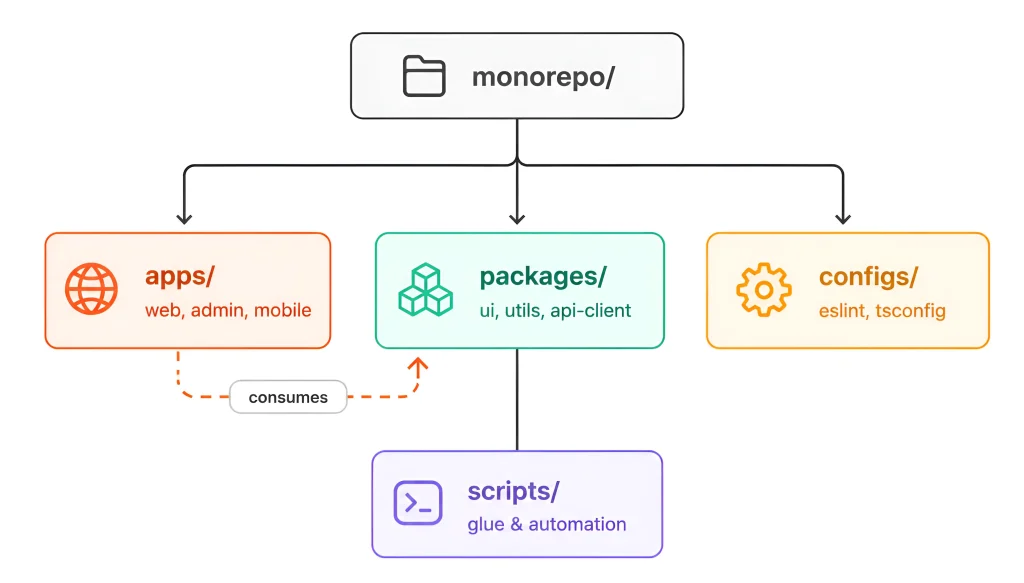
A typical setup has an apps folder for the deployable stuff and a packages folder for the shared code those apps lean on. Then there’s usually a configs folder for shared ESLint and TypeScript setup, so nobody’s hand-copying a config file into five places, plus some kind of scripts folder for internal glue. Apps consume, packages provide. Keep that direction consistent, and things stay sane. Let it slip, and you will end up with a dependency nobody is willing to touch.
How Workspaces Tie It Together
None of it works without workspaces. That’s the mechanism that lets packages inside the repo depend on each other without publishing to npm first. It is supported by many package managers like npm, Yarn. Add all the folders that count as workspace packages in the root package.json, and the package manager will notices a dependency already exists locally. Now if someone modifies a shared component, hit save, then app using that component updates instantly as well. No publishing, no version bump, no waiting around.
What Actually Happens Inside dependency files?
Instead of a real copy of your internal package sitting in some dependency folder, there is only a link pointing back to the packages directory, and the package manager follows it as if it were nothing special. Node: node_modules is still there, but third-party stuff has to live somewhere after all, it’s just your own internal packages that get symlinked in vs. copy-pasted around. pnpm goes further with a thing called a content-addressable store, which is basically one physical copy of each version of a package on disk, hard-linked into every project that needs it. Saves quite a bit of space, and as a nice side effect, also prevents a package from sneaking into dependencies it never really declared in the first place.
Some popular tools
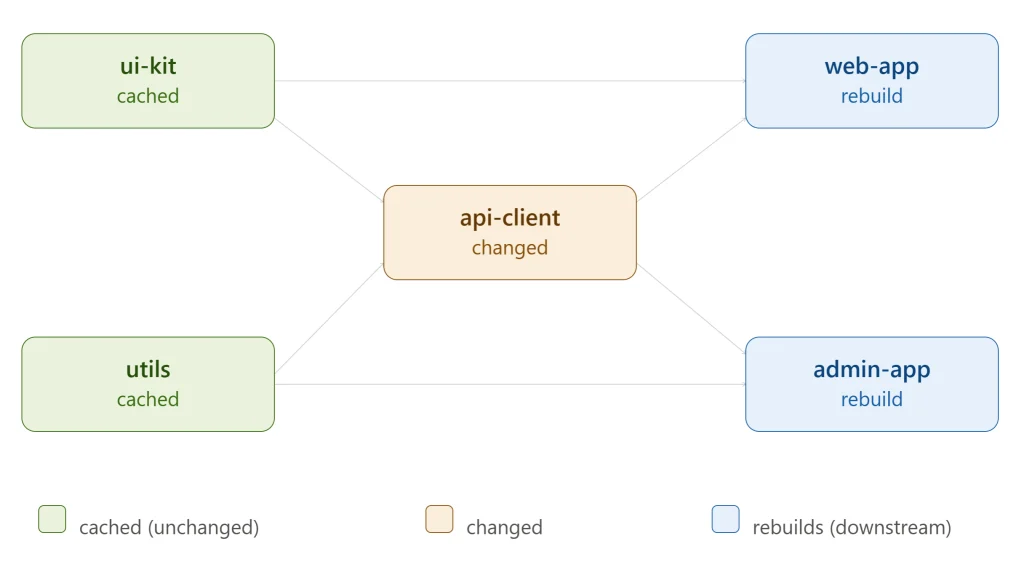
When the codebase has multiple packages and applications, running one big build command every time stops making sense, time and effort end up redoing work on things that never changed. Here, popular libraries like Turborepo and Nx, come into play. They look at how the packages depend on each other, turn that into a task graph, and use it to build unrelated packages side by side instead of one after another, while only touching whatever actually changed plus the things sitting downstream of it.
Why Caching Is the Real Win
This is where caching earns its reputation. These tools hash a task’s inputs, things like source files, config, and dependency versions, and use that as a cache key. Nothing relevant changed? The build replays the last result instead of doing the work over. Take this out into a remote cache used by everyone on the team, and CI system, and the pipeline that once took fifteen minutes to rebuild everything from scratch can now take two minutes, because now the pipeline is only building what has changed since the previous run. It is here that people generally stop considering a monorepo a compromise.
Deciding What to Share, and How to Version It
While developing, there is no need of keeping everything in a shared packages. A UI component library, common utilities, typed API clients, and shared configuration are typical candidates for packages that can be reused across applications. And once stuff is shared internally, somebody always asks about versioning eventually. Some teams bump the whole repo as one release; others version packages independently. If you’re publishing externally, Changesets has more or less become the standard. Engineers see what is changed, and the tool handles version and changelogs.
CI That Only Tests What Changed
The CI system gets to enjoy the very same graph that the build tools use. Rather than running all tests on each PR, a good pipeline will run the tests on those files that actually changed, traverse through the dependency graph and build and test those which might have been impacted by the changes. In essence; a single line of update in the “web-app” won’t lead to the rebuilding of the completely unrelated “admin-app” if there is no dependency between them.
The Trade-offs
None of this is free, and it’s worth just saying so. Circular dependency is easy to develop and can be quite irritating to resolve when you already have it. Applications tend to depend on six internal packages in a very casual way until there’s nothing to say straight-faced about what depends on what. PR and testing become really big, since it can affect five projects at one. Ownership gets blurry, too. Whose code is this, really, when it’s all sitting in the same place? And the tooling itself is a layer somebody has to own and keep working.