

This started with a fairly simple customer request. They wanted to ask questions in plain English and get answers from data that already existed in our application database. We decided to build the feature using Amazon Bedrock and a Amazon Bedrock Knowledge Base for retrieval. At first, it sounded like a straightforward text-to-SQL problem. It wasn’t. Most of the work ended up being around documentation, validation, and keeping bad queries away from production.
Why doesn’t the obvious approach work
The obvious approach is to paste your schema into a prompt and ask the model to write SQL. We started with this simple approach first, to see what kind of output the model would produce. The plan was to understand and learn from the outcome. As expected, the results were good enough to prove the idea, but nowhere near reliable enough to use in production.
Like many long-running enterprise applications, our database wasn’t designed all at once. It has evolved over several years, with features, migrations, and customer-specific requirements gradually adding more tables. Somewhere around 100-plus tables. The application is multi-tenant, so there are more than 1000 customers, and each customer has more than 100 tables. Some of the fields have technical names that are not self-explanatory. So the model cannot understand what the tables and columns are about unless columns have user-friendly names or there is some explanation the knowledge base contains about the table.
Accuracy wasn’t the only concern. Performance was an even bigger one. Some of our tables contain hundreds of millions of rows, so a poorly generated query isn’t just incorrect; it can put unnecessary load on the database. During one of our early tests, the model generated a query that would have scanned an entire ledger table because it missed an important filter. We caught it before execution, but that was enough to change our approach. From that point on, we treated this as an engineering and governance problem rather than simply a prompting problem.
The unglamorous part: writing down what the schema means
To improve the model’s database understanding, the biggest improvement came from something that wasn’t related to prompting at all. We invested time in documenting what the schema actually meant. We started documenting each and every database table and field in plain language. We focused more on describing business meaning of each of the fields. We deprioritized detailing on Constrains and datatypes in detail. To achieve query accuracy from the user’s prompt it was important for the mode lto know the business meanings of the columns. The stuff that actually matters is below:
- What does a field mean in business terms, and when you’d reach for it
- Which of the similarly named tables is the real source of truth (and which ones are leftovers from a migration in 2021 that nobody deleted)
- Relationships that are true in practice but were never enforced with a foreign key
- Clear explanations of how similarly named fields from transactional and health tables relate to each other
We also loaded the ER diagram itself into the knowledge base, and wrote short usage notes per table, things like using transactions summary for aggregates, only touch health report tables if you genuinely need line items, it’s ten times bigger and slow to scan.
The schema tells the model what queries are possible. The notes are what taught it which queries are right. If you take one thing from this post, take that.
How a question actually flows through
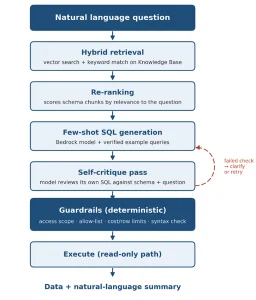
The pipeline, from question to verified SQL.
When a user submits a question in natural language, hybrid retrieval comes first, doing vector search along with keyword matching against the knowledge base. We added keyword and metadata filters, which helped us fix issues where similar fields from two different tables required decision-making. Then a re-ranking pass re-scores the retrieved chunks against the actual question, because raw retrieval order was noisier than we expected.
Few-shot examples from the prompt are used for generation. Not general online text-to-SQL samples. The model incorporates our join patterns and naming standards by using actual question-to-SQL combinations from our own system that we manually checked.
Then the model does a self-critique pass, checking its own SQL against the retrieved schema and the original question. Did it join a table it never should have touched? Does the filter actually match what was asked? We never trust that check on its own. Everything still goes through deterministic guardrails before execution. The model grading its own homework is a nice first filter, not a safety mechanism.
Guardrails
This is where most of our engineering time went, and it’s the part that never makes it into anyone’s demo.
We started our plan with keeping guardrails first in mind so that we can protect our apps from unauthorized requests. Every request carries the user’s identity and permission scope. Generated queries get constrained to the tenant, role, and data domain that person is entitled to, with filters rewritten in before execution when needed. A user who does not have access to sensor configuration data must not be able to access the configuration data in response.
On top of that, every statement gets validated before it runs. Only SELECT is allowed, full stop. Tables and columns get checked against an allow-list built from the retrieved context, which is how we catch hallucinated fields (frequent in the first few weeks, rare now). We flag unbounded joins and missing WHERE clauses on the big tables. Row limits are enforced server-side regardless of what the model wrote. And the SQL is parsed against the actual engine grammar, so syntax problems trigger a clarifying re-prompt instead of an ugly stack trace.
Semantic Caching and query templates
We implemented some of the standard techniques that are used while implementing RAG patterns. Semantic caching is one of the techniques we implemented. Many of the user prompts were returning similar queries, so instead of doing inference with the model again, we implemented semantic caching. Slot-filled query templates now handle the most common analytical shapes, because free-form generation is where hallucinated joins come from, so we shrank that surface. Chain-of-thought prompting went in after “show me problem tenants” produced three different interpretations in one afternoon; now vague terms get resolved against documented metrics first, and if the ambiguity is real, the system asks. And every query, pass or fail, plus any human correction, lands in a benchmark set we re-run regularly. That loop is how documentation gaps show up as patterns instead of as angry one-off messages.
Where it landed
Today, a business user types “show me all the devices with more than 15 alerts in last 7 days” and gets an answer in a few seconds. The pipeline pulls devices, alerts, and usage-history context, writes SQL using documented relationships, and passes critique and guardrails.
To summarize the solution, documentation of the schema is of equal importance to the model. Your schema documentation defines the accuracy of the outcome you are expecting for the SQL queries. So it is not only a prompt we are fine-tuning, but we also need to build knowledge and governance along with it.