
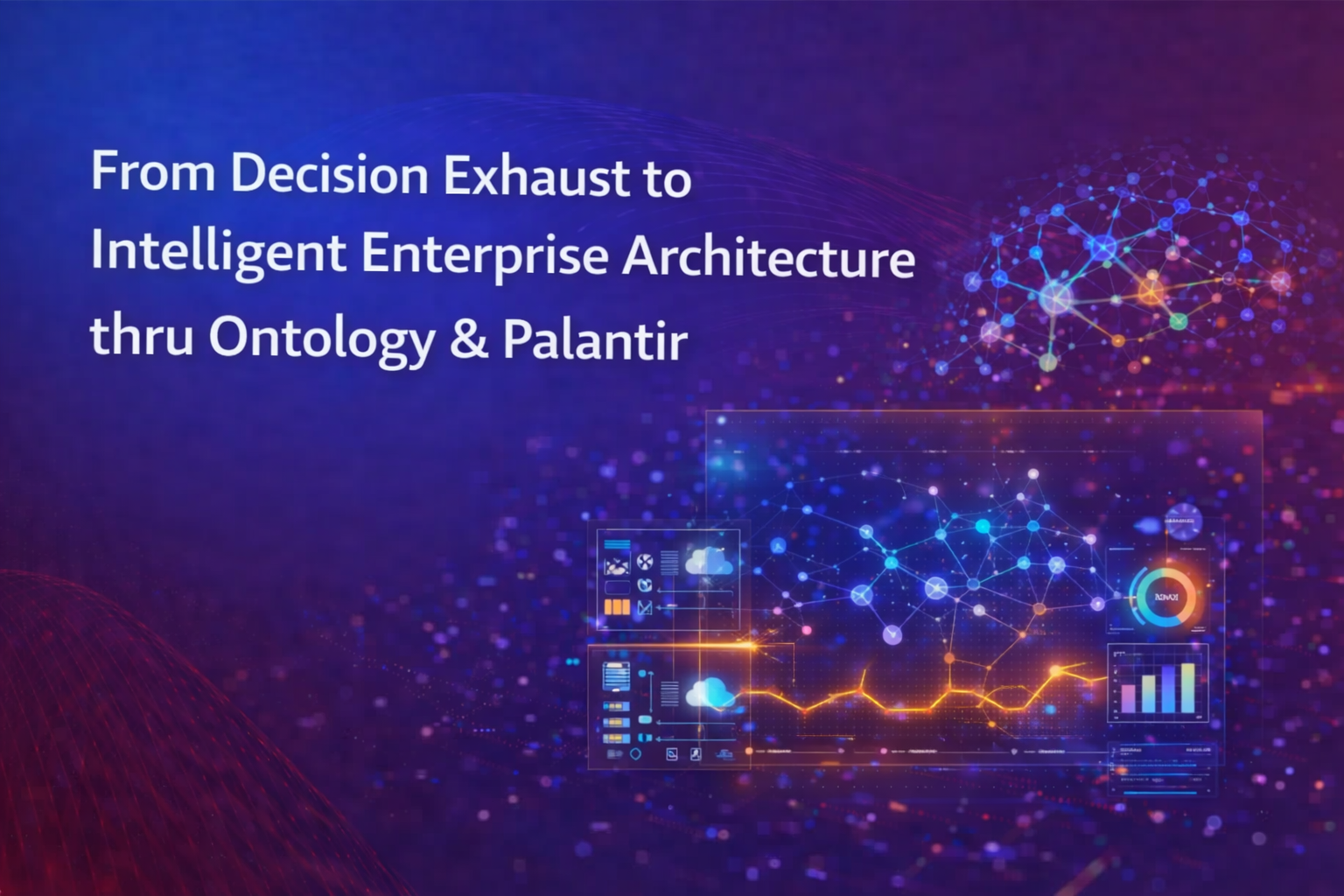
From Decision Exhaust to Intelligent Enterprise Architecture thru Ontology & Palantir
In the first article, I introduced the idea that most enterprises stop at automation, but very few become truly intelligent machines.
Over the past few decades, enterprises have invested heavily in ERP modernization, cloud data platforms, AI capabilities, BI dashboards etc. Yet still during peak operational periods, most organizations still rely on spreadsheets, escalation emails, war-room meetings, and manual overrides.
Most companies automate tasks. Very few redesign how decisions are made, governed, executed, explained, and learned from.
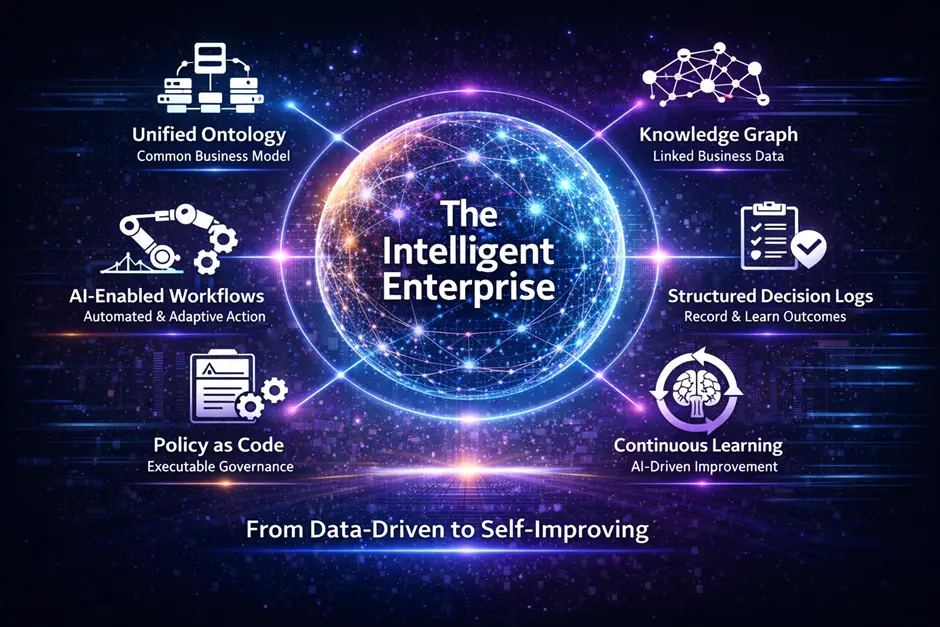
In this article, I would like to explore this further on what does it actually take to implement an Intelligent Enterprise architecture. To illustrate this, I would like to use Palantir as an example. This also helps clarify what #palantir does since most people still think palantir just as yet another data or AI platform. In reality, it is a system that models how a business operates so decisions can be made, executed, and learned from end-to-end.
How do data, decisions, workflows, GenAI, and enterprise integrations come together into a single Palantir system?
To keep this grounded, we will continue using the same use case:
A retailer, Planning and Allocating a Black Relaxed Hoodie across 100 stores.
The Use Case
- Retailer: OmniRetailCo
- Product: Black Relaxed Hoodie
- Stores: 100
- Distribution Center: Dallas
- DC Planning Week: Week 39
Initial demand signals for few stores for illustration:
| Store | Forecast (P50) | Forecast (P90) |
|---|---|---|
| Dallas | 120 | 150 |
| Austin | 110 | 135 |
Total demand across the store network ≈ 12,000 units
But the Dallas distribution center can only process: 8,000 units
This mismatch between demand and capacity is what we will architecture and it will hopefully pave the path to solving the decision exhaust problem within Enterprises.
1. Define the Operational Language (Ontology)
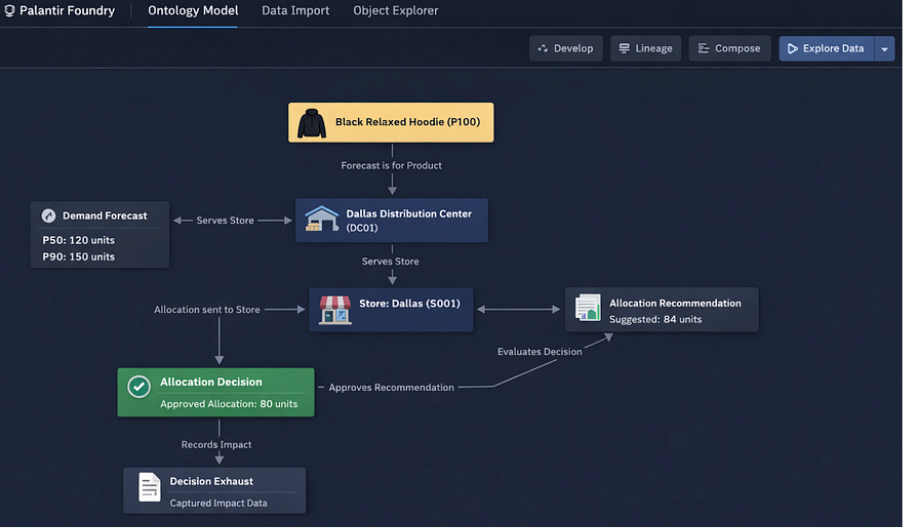
The foundation of the #Palantir system is a shared operational language. In #Palantir Foundry, this is implemented using the Ontology, where business entities are modeled as object types backed by datasets.
Core objects:
- Product
- Store
- Distribution Center
- Forecast
- Allocation
- Recommendation
- Decision
- Outcome
- Policy Rule
- Scenario
- Decision Exhaust
Example Product dataset:
| product_id | sku | product_name | cost | retail_price |
|---|---|---|---|---|
| P100 | BRH-01 | Black Relaxed Hoodie | 40 | 60 |
These objects form the digital twin of the enterprise — a living model of business operations that applications, workflows, and AI systems operate on.
2. Define Relationships in Business Language
Relationships between ontology objects are defined using link types, which are expressed in plain business language.
Examples:
- Forecast is for Products
- Forecast is for Stores
- Stores is served by Distribution Center
- Distribution Center fulfills Stores
- Recommendation suggests allocation for Stores
- Decision approves Recommendation
- Decision applies Policy Rule
- Outcome evaluates Decision
These relationships are not just structural. They are semantic and readable. In cases where relationships require context, object-backed links are used. This allows relationships themselves to carry business operational meaning.
3. Build Data Pipelines, Lineage, and Context
All business operational data flows through pipelines built in #palantir Foundry using:
- Pipeline Builder
- Code Repositories (Python / Spark / SQL)
Typical data sources:
- POS transactions
- Inventory snapshots
- Shipments
- Promotions
- Capacity data
- Vendor inputs
Pipelines transform these into structured datasets for demand planning, forecasting and optimization.
Every dataset is fully traceable through Data Lineage:
- Upstream source
- Transformation logic
- Downstream consumers
AI is embedded directly in pipelines to process unstructured inputs:
- Extract promotion details from documents
- Classify vendor communications
- Summarize operational notes
- Normalize free-text inputs into structured signals
This ensures the operational graph can tap into organizational intelligence in the form of both structured and unstructured data.
4. Demand Planning, Forecast Generation and Model Lifecycle
Forecasts (P50, P90) are generated using machine learning models built and managed in #panatir Foundry.
Example:

| Store | forecast_p50 | forecast_p90 |
|---|---|---|
| Dallas | 120 | 150 |
| Austin | 110 | 135 |
Models are:
- Versioned
- Monitored
- Retrained
- Deployed
Using AIP Analyst, planners can interact with forecasts using natural language where AI can interpret and reason:
- Explain forecast changes
- Identify drivers of demand
- Compare forecast accuracy
AI acts as a natural language interface over model outputs and lineage.
5. Operational Applications
Planners interact with the system through Operational Applications (Workshop).
A planner viewing a product sees:
- Demand signals
- Inventory
- Allocations
- DC capacity
- Risks
- Scenarios
Different applications exist for different personas – Demand Planner, Allocation Analyst, Store Manager, Executives etc.
Inside applications, AI acts as a copilot:
- Explain operational issues
- Summarize risk
- Highlight anomalies
- Answer business questions
6. Generate Allocation Recommendations
At this stage, the system is solving a constrained business decision problem using the operational graph defined in the ontology.
The objective is not just to predict demand, but to: “Maximize margin under real-world constraints”
The system brings together all relevant signals into a single decision context:
- Demand signals (Forecast P50 / P90 etc.)
- Supply constraints (DC capacity = 8,000)
- Inventory availability
- Store performance (sales velocity, conversion rates)
- Financials (margin per unit = $20)
- Policy rules
The system translates this into a constrained optimization problem.
a) Starting with unconstrained demand:
- Dallas demand = 120
- Austin demand = 110
- …
- Total demand ≈ 12,000 units
If there were no constraints, the system would allocate to meet full demand.
b) Apply capacity constraint at DC
- Total available capacity = 8,000 units
- Shortfall = 4,000 units
This forces the system to decide where to allocate limited supply.
c) Score each store
Each store is assigned a priority score based on:
- Demand level
- Sales velocity
- Margin contribution
- Historical performance
Example:
| Store | Demand | Velocity | Margin | Score |
|---|---|---|---|---|
| Dallas | 120 | High | High | 0.92 |
| Austin | 110 | Medium | High | 0.88 |
d) Allocate proportionally with constraints
The system could evenly distributes inventory using a weighted allocation approach or using some sophisticated constrained optimization approach:
- Higher score → higher share of constrained supply
- Ensures total allocation ≤ 8,000
- Ensures fairness / policy limits are respected
| store | Current | recommended |
|---|---|---|
| Dallas | 80 | 84 |
| Austin | 80 | 82 |
e) Apply policy adjustments
Policies further refine the output:
- Avoid extreme deviations across stores
- Cap allocation shifts
- Enforce minimum thresholds
These are also stored as Allocation Recommendation Ontology objects.
AI explains recommendations:
- Why allocation changed?
- What constraints influenced it?
- Summarize tradeoffs?
Example reasoning:
- Dallas has higher forecast demand (120 units)
- Sales velocity is above average (+12%)
- Higher margin contribution relative to other stores
- Allocation reduced from unconstrained demand due to DC capacity limit
- Redistribution applied across all stores
Because relationships are defined in business language in the ontology, the system can express this in plain English:
“Dallas store received a higher allocation because it is linked to the product with stronger demand and higher sales velocity. However, the allocation was limited due to the Dallas Distribution Center capacity constraint, which required redistribution across all stores”
f. Tradeoffs Are Explicit
The system also evaluates what it could not do due to policies making the decision transparent,
- Increasing Dallas further would reduce allocation to other stores
- Total allocation must remain within 8,000 units
g. AI as the Reasoning Layer
GenAI is embedded at this stage to:
- Explain why recommendations changed
- Summarize constraints and tradeoffs
- Simulate alternative scenarios
- Allow planners to ask questions in natural language
What happens if we prioritize top-performing stores only and the system can recompute and explain instantly and help enable what if analysis and simulation
7. Evaluate Recommendations Against Policies
At this stage, the system has produced a proposed allocation with full reasoning. But recommendations cannot execute blindly. They must be evaluated against explicit business policies. Policies are modeled as first-class objects in the ontology and linked to decisions.
Example policies:
| Policy | Condition | Action |
|---|---|---|
| Auto-approve small changes | Δ ≤5% | Approve |
| Capacity Constraint | Total Allocation > 8,000 | Rebalance |
| High margin risk | Lost margin $50K | Escalate |
The system evaluates each recommendation by computing:
- Delta from current allocation
- Aggregate allocation across all stores
- Projected margin impact
- Constraint violations
Dallas recommendation:
- Current allocation = 80
- Recommended = 84
- Delta = +5% → qualifies for auto-approval
Also perform global check:
- Total recommended allocation = 9,000
- Capacity = 8,000 → constraint violated
The system does not reject the recommendation outright. It resolves the conflict by:
- rebalancing allocations across stores
- prioritizing higher scoring stores
- maintaining policy constraints
This produces a policy-compliant recommendation set. AI explains policy outcomes in plain language:
The recommendation was adjusted because total allocation exceeded the Dallas DC capacity. The system redistributed units across stores while maintaining priority for high-performing locations.
It can also answer: Which policy caused this change? What would happen if we relaxed the threshold?
8. Workflow Execution, Decisions, and ERP Integration (MCP)
At this point, the system moves from reasoning → action orchestration.
A workflow is triggered automatically when:
- New recommendations are generated
- Policy evaluation is complete
The workflow engine performs:
- Classify the decision (auto-approve -> require approval -> escalate)
- Route the decision (Planner -> Director, MP&A -> VP, MP&A)
- Automated execution
Track state transitions (pending -> approved/rejected -> executed)
Human-in-the-Loop (When Needed):
Planners can review recommendations, see reasoning and tradeoffs, override decisions, leave comments etc. All actions are captured in the system.
Once approved, the decision will be executed in operational systems such as ERP.
Instead of tightly coupled APIs, the system uses MCP (Model Context Protocol) to execute actions.
- Decision is approved in Foundry
- Action Type is triggered (e.g., “Update Allocation”)
- MCP generates a structured tool call
- ERP system consumes the action
- Execution status is returned
- Status is written back to the ontology closing the look and enabling bi-directional integration
{
“action”: “update_allocation”,
“store_id”: “Dallas”,
“product_id”: “P100”,
“approved_units”: 80
}
9. Measure Outcomes, Capture Decision Exhaust, and Drive Learning
At this point, the system has already:
- Generated recommendations
- Applied policies
- Executed workflow
- Pushed decisions to ERP via MCP
Now the question is: Did the decision actually work and is this the best decision the team could have taken? This is where true intelligence actually begins. Test -> Learn -> Refine.
Once allocations are executed, real-world business outcomes flow back into the system.
| Store | Approved Allocation | Observed Sales |
|---|---|---|
| Dallas | 80 | 80 |
| Austin | 80 | 78 |
Observed sales are constrained by supply, not pure demand. The system reconstructs demand using:
True Demand = max(Forecast, Observed Sales)
| Store | Forecast | Sales | True Demand |
|---|---|---|---|
| Dallas | 120 | 80 | 120 |
| Austin | 110 | 78 | 110 |
This step separates from “What happened?” to “What could have happened?” Now the system calculates the consequence of constraints.
Inputs:
- Retail price = $60
- Cost = $40
- Margin = $20
Example:
| Store | True Demand | Allocation | Lost Units | Lost Margin |
|---|---|---|---|---|
| Dallas | 120 | 80 | 40 | 800 |
| Austin | 110 | 80 | 30 | 600 |
At scale:
- Total demand = 12,000
- Allocation = 8,000
- Lost units = 4,000
- Lost margin = $80,000
This happens to be the financial consequence of the decision.
10. Capture Decision Exhaust as a Complete System Record
Now the system captured everything that led to this outcome. It is a fully connected dataset that preserves the entire lifecycle of a decision.
Comprehensive Decision Exhaust Model
decision_exhaust:
decision_id: “Unique identifier for this decision”
product: “Product being planned (e.g., Black Relaxed Hoodie)”
store: “Store where the decision was applied”
planning_week: “Week of execution”
demand_signal:
forecast_p50: “Baseline expected demand”
forecast_p90: “Upside demand potential”
recommendation:
suggested_allocation: “System recommended units”
confidence_level: “Confidence in recommendation (0–1 scale)”
key_drivers:
– “Primary factors influencing the recommendation (e.g., demand, velocity)”
tradeoffs_considered:
– “What the system had to balance or sacrifice”
final_decision:
approved_allocation: “Final units approved for execution”
change_from_recommendation: “Difference from suggested allocation”
policy_applied: “Policy that influenced the decision”
constraint:
type: “Type of constraint (e.g., capacity, policy, manual override)”
impact_level: “Severity of constraint impact (low / medium / high)”
approval_details:
approval_flow:
– “Planner”
– “Director”
– “VP”
overridden: “Was the recommendation overridden? (true/false)”
override_reason: “Reason for manual override (if applicable)”
execution:
execution_status: “Success / Failed / Pending”
execution_time: “Timestamp when action was executed in ERP”
outcome:
actual_sales: “Units sold”
estimated_true_demand: “Demand including unmet demand”
unmet_demand_units: “Units that could not be fulfilled”
lost_margin: “Revenue impact due to unmet demand”
context:
scenario: “Scenario under which the decision was made (if applicable)”
Example:
| Store | Forecast | Recommended | Approved | Sales | True Demand | Lost Margin | Policy | Constraint |
|---|---|---|---|---|---|---|---|---|
| Dallas | 120 | 84 | 80 | 80 | 120 | 800 | Capacity | DC Limit |
Because the system captures decision + context + outcome together, it can now answer:
- Which constraints consistently reduce margin?
- Which stores are systematically under-allocated?
- Which policies are too conservative?
- Where do overrides happen most often?
- Which decisions delivered the highest ROI?
AI as the Reasoning Layer Over Decision Exhaust
- Operating over structured decision history.
- Explain why decisions failed
- Summarize weekly performance
- Identify recurring patterns
Recommend policy changes
Suggest capacity investments
Example:
Dallas stores consistently lose margin due to DC capacity constraints. Increasing capacity by 10% would reduce lost margin by approximately $12,000 per week.
It can also answer:
- What are the top 5 constraints impacting margin?
- Which decisions required overrides most often?
- What policy changes would improve outcomes?
11. Close the Learning Loop
Now the system feeds this intelligence back into itself for continuous learning and recommendation
- Forecast models – Learn from true demand (not constrained sales)
- Allocation logic – Adjusts prioritization based on impact
- Policies – Evolve based on outcomes
- Capacity planning – Becomes data-driven
Now, The system now operates as a continuous loop:
Signal → Recommendation → Policy → Action → Outcome → Decision Exhaust → Learning
- “Most systems remember data”,
- “Very few systems remember decisions”,
- “Fewer still understand their consequences”
An Intelligent Enterprise does all three!

Kumar Raman is the Chief Product and Technology Officer with over 20 years of experience in Data, Analytics, and AI leadership. He specializes in shaping AI-driven data strategies, modern architectures, and large-scale transformation initiatives that deliver measurable business outcomes. Kumar has led multimillion-dollar programs, modernizing data platforms and embedding AI into enterprise decision-making. He is also a trusted advisor to executive leadership, helping organizations accelerate their journey toward intelligent, AI-powered operations.